How to Use AI APIs from Algeria and Pay in Dinars
The best AI models are a few lines of code away, but paying for them from Algeria has always been the hard part. This guide explains why, compares the options developers use today, and shows how to call 200+ models with one OpenAI-compatible API key and a balance you top up in dinars with CIB, Edahabia or BaridiMob.
On this page
You can read about a new AI model on Monday and ship a feature with it on Tuesday. For most developers in the world, the only thing between the idea and the first API call is a few lines of code.
In Algeria, the first obstacle usually isn't the code. It's the payment.
This guide explains why paying for AI APIs from Algeria has been so hard, compares the options developers actually use, and shows how to make your first call to more than 200 models with one API key and a balance you top up in dinars, with the CIB, Edahabia or BaridiMob card you already have.
The real obstacle is payment, not technology
Access to the models is usually not the issue. Anthropic, for example, lists Algeria among the countries where its API is supported.1 The models are there. What's missing is a way to pay for them that fits how Algerians actually pay.
AI APIs are usually billed in US dollars, to an international Visa or Mastercard, every month, based on usage. That is exactly the kind of payment that is hard to make from Algeria:
The foreign-currency allowance is tied to travel. Under instruction n° 07-2026 of the Banque d'Algérie, in force since 19 July 2026, the travel allowance is credited only to an international card in the holder's name, and online purchases are allowed when they are linked to the purpose of the trip abroad.2
It is capped. The allowance is €750 per year for adults aged 19 and over.3
Local cards stay local. CIB and Edahabia are excellent for paying in dinars inside Algeria, but they are not what a foreign checkout page expects.
So the problem is not talent and it is not access to the models. It is that a monthly API bill in dollars doesn't fit the payment tools most Algerian developers have.
The options developers have tried
Here is an honest look at the routes we see Algerian developers take today.
| Option | How it works | Where it breaks |
|---|---|---|
| Travel allowance card | Use the international card linked to your yearly allowance. | It is designed for spending linked to a trip, it is capped per year, and it belongs to one person. |
| A friend or relative abroad pays | Someone outside Algeria adds their card to your account. | Your project depends on someone else's card, and every top-up needs a favour. |
| Run open models yourself | Download an open-weight model and run it on your own GPU. | Good GPUs are expensive, the strongest models need far more hardware than a laptop has, and you maintain everything. |
| DEVUP AI | Top up a balance in dinars with CIB, Edahabia or BaridiMob, and call 200+ models with one key. | Built for this exact problem. |
DEVUP AI: one key, 200+ models, paid in dinars
We built DEVUP AI so that an Algerian developer can use world-class AI with the same ease as anyone else. You don't need a Visa card or a foreign bank account. You top up in dinars with the card that is already in your wallet, and you build.
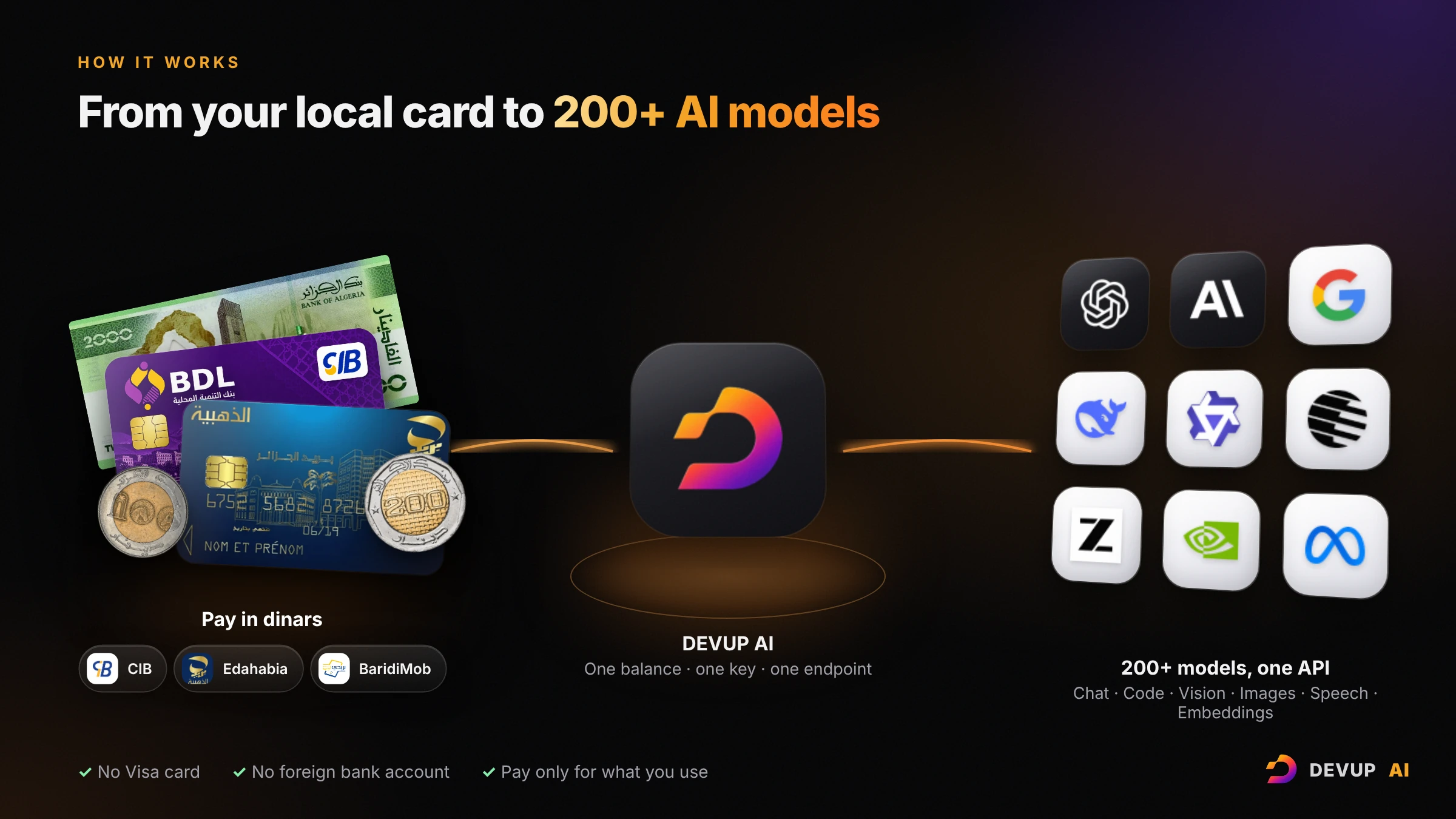
What you get:
Payment that works in Algeria. Top up your balance in Algerian dinars with BaridiMob, CIB or Edahabia. Your balance and your usage are in DZD, so you always know what you spend in your own currency.
You pay only for what you use. Usage is deducted from your balance as you go (per token for text models). No dollar invoice at the end of the month.
200+ models behind one API key. Models from OpenAI, Anthropic, Google, DeepSeek, Qwen, Moonshot (Kimi), Z.ai (GLM), NVIDIA and others, for chat, code, vision, image generation, speech and embeddings.
OpenAI-compatible. If your code already uses the OpenAI SDK, you change the API key and the base URL. Everything else stays the same.
Privacy by default. We don't store the content of your prompts or of the model's replies. We keep only usage metadata (model, tokens, cost), and we don't train on your data.
More than an API. The same account and the same dinar balance work with Claude Code, with our DEVUP Code extension for VS Code, Cursor and Antigravity, and with on-demand GPU and CPU instances billed by the second.
You can explore every model, with its capabilities, in the model catalog.
From zero to your first API call in four steps
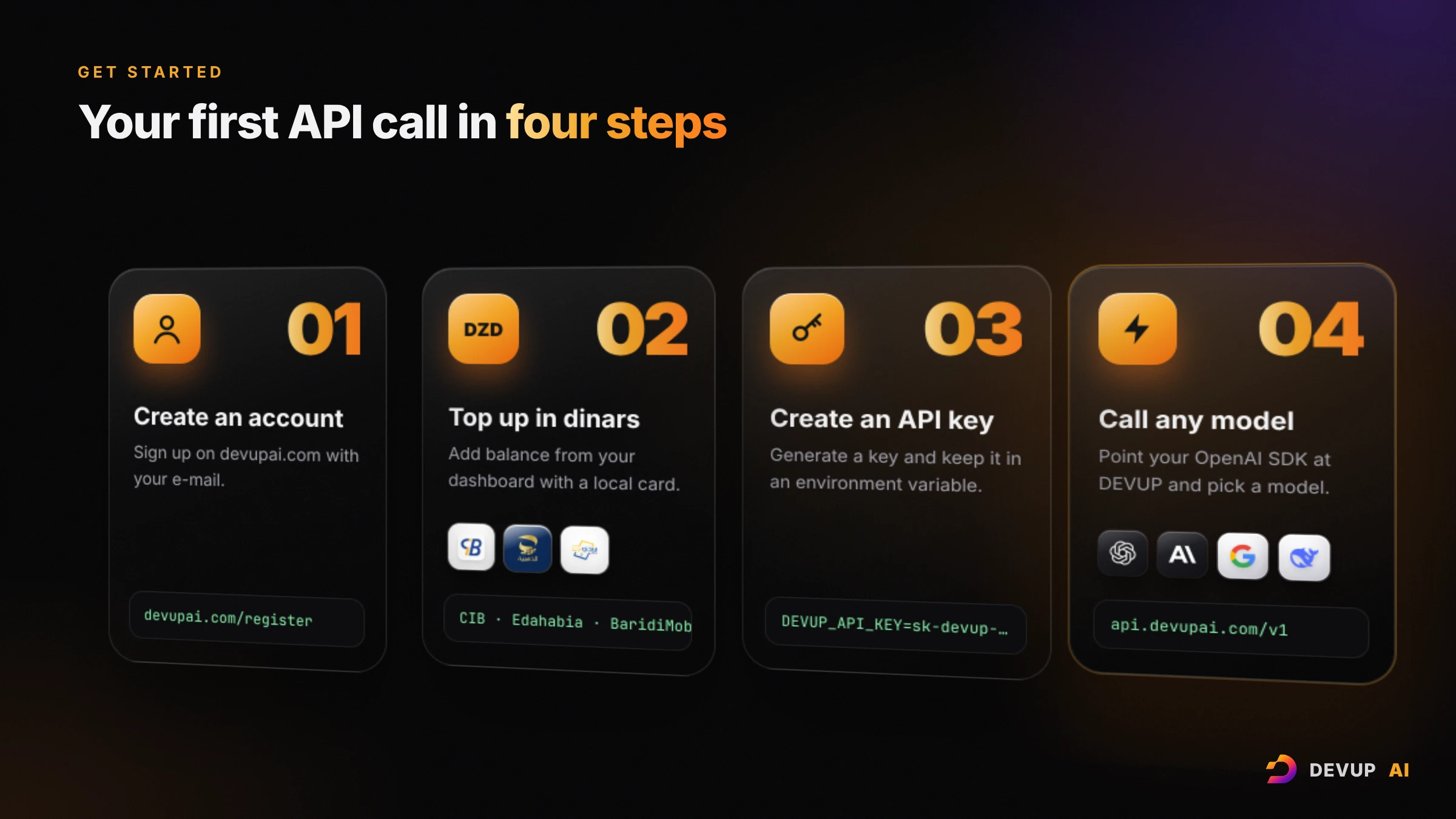
Create an account. Sign up at devupai.com/register.
Top up in dinars. From your dashboard, add balance with CIB, Edahabia or BaridiMob.
Create an API key. Open Dashboard → API Keys, create a key, and store it in an environment variable. Keys start with
sk-devup-.Make your first call. Use one of the examples below.
Set your key once in your terminal:
export DEVUP_API_KEY="sk-devup-your-api-key"On Windows PowerShell:
$env:DEVUP_API_KEY = "sk-devup-your-api-key"Python
Install the official OpenAI SDK with pip install openai, then:
import os
from openai import OpenAI

client = OpenAI(
    api_key=os.environ["DEVUP_API_KEY"],
    base_url="https://api.devupai.com/v1",
)

response = client.chat.completions.create(
    model="deepseek-ai/DeepSeek-V4-Pro",
    messages=[
        {"role": "user", "content": "Explain what an API key is in two sentences."}
    ],
)

print(response.choices[0].message.content)
Node.js
Install the SDK with npm install openai, then:
import OpenAI from "openai";

const client = new OpenAI({
  apiKey: process.env.DEVUP_API_KEY,
  baseURL: "https://api.devupai.com/v1",
});

const response = await client.chat.completions.create({
  model: "deepseek-ai/DeepSeek-V4-Pro",
  messages: [
    { role: "user", content: "Explain what an API key is in two sentences." },
  ],
});

console.log(response.choices[0].message.content);
Prefer a dedicated client? Our official SDK is on npm: npm install devupai.
cURL
curl https://api.devupai.com/v1/chat/completions \
  -H "Authorization: Bearer $DEVUP_API_KEY" \
  -H "Content-Type: application/json" \
  -d '{
    "model": "deepseek-ai/DeepSeek-V4-Pro",
    "messages": [
      {"role": "user", "content": "Explain what an API key is in two sentences."}
    ]
}'Already using the OpenAI SDK? Change two lines
If you have a project that already talks to OpenAI, you don't need to rewrite it. Point the same client at DEVUP AI and keep your code, your methods and your response handling.
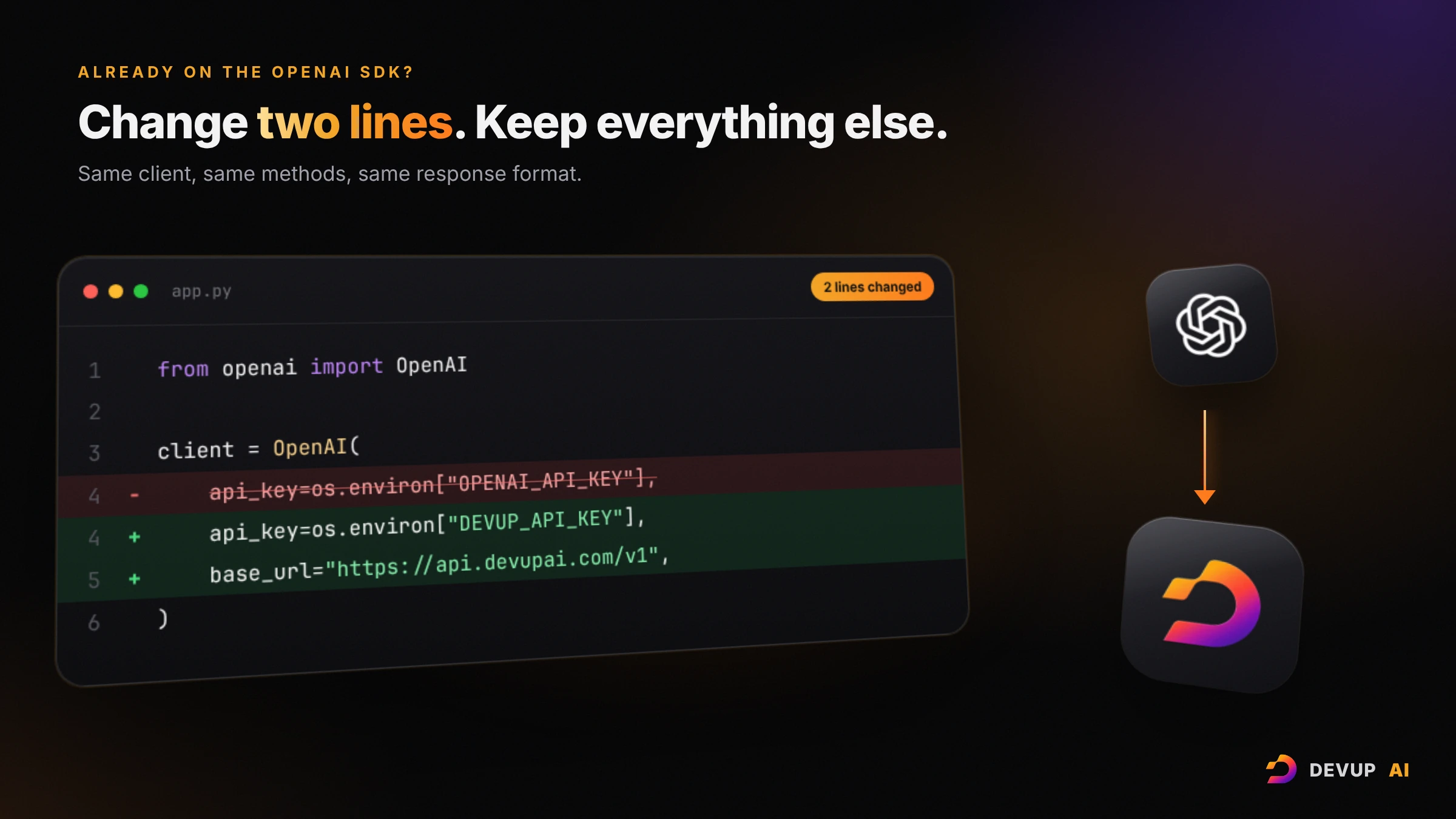
That is the whole migration: a different key, and the base URL https://api.devupai.com/v1.
Switch models with one line
With one key, every model in the catalog is one string away. Change the model value and run the same code again:
model="deepseek-ai/DeepSeek-V4-Pro"   # DeepSeek
model="anthropic/claude-sonnet-5-5"   # Anthropic Claude
model="openai/gpt-6.1-sol"            # OpenAI GPT
This makes it easy to test the same prompt on several models, keep the one that fits your quality and budget, and switch later without touching the rest of your application.
 DeepSeek-V4-Pro
- Tools
- Reasoning (optional)
- Structured output
 claude-sonnet-5-5
- Tools
- Vision
- Reasoning
 gpt-6.1-sol
- Tools
- Vision
- Reasoning
- Structured output
Use it in the tools you already work with
DEVUP AI is not only for code you write by hand. It plugs into the tools developers already use every day:
Claude Code. Point Claude Code at DEVUP AI with the Anthropic-compatible endpoint, and pay for your coding sessions in dinars. See the Claude Code guide.
DEVUP Code for your editor. Our free extension adds an AI assistant to VS Code, Cursor and Antigravity. You sign in with your DEVUP account, with no key to copy. See DEVUP Code.
Frameworks. LangChain, the Vercel AI SDK, AutoGen and the Python ecosystem all work through the OpenAI-compatible API. See all integrations.
What this changes for builders in Algeria
When payment stops being the obstacle, the questions become the right ones: which model gives the best answer for my users, how fast it is, and what it costs per request.
Students can learn with the same models used in industry, from their first project.
Freelancers and agencies can add AI features to client projects and budget them in dinars.
Startups can prototype on several models in one afternoon, then go to production on the same account.
Researchers and teachers can compare models on Arabic, French and English tasks without opening a foreign account.
That is the reason DEVUP AI exists: Algerian developers should be able to build with the best AI in the world, starting today, with what they already have.
Frequently asked questions
Do I need a Visa or Mastercard?
No. You top up your DEVUP AI balance in Algerian dinars with BaridiMob, CIB or Edahabia.
Can I keep my existing OpenAI code?
Yes. The API is OpenAI-compatible. Set your DEVUP API key and the base URL https://api.devupai.com/v1, and use the model ID of the model you want.
Which models can I use?
More than 200 models, including models from OpenAI, Anthropic, Google, DeepSeek, Qwen and Moonshot (Kimi), for text, code, vision, images, speech and embeddings. The full list is in the model catalog.
Do you store my prompts?
No. We don't store the content of prompts or replies. We keep only usage metadata (model, tokens, cost), and we don't train on your data.
Start building today
Create your account, top up in dinars, and make your first API call today.
Create your DEVUP AI account · Read the docs
Notes
Anthropic, "Supported countries and regions". anthropic.com/supported-countries
Algérie Eco, "Allocation touristique : la Banque d'Algérie répond aux principales questions sur le nouveau dispositif", 15 July 2026. algerie-eco.com
Algérie360, "750 € sur Visa et Mastercard : ce que les banques algériennes vous autorisent à payer en ligne", updated September 2026. algerie360.com
About DEVUP AI
AI infrastructure for developers — models, compute and media APIs with local DZD billing via BaridiMob and Edahabia.
Get an API key


