Project instructions and AGENTS.md for your AI assistant
DEVUP AI reads AGENTS.md and .devupai/rules.md from the root of each folder in your workspace, and you can switch either one off. Your personal instructions, written once in Settings, go with every chat in every project.
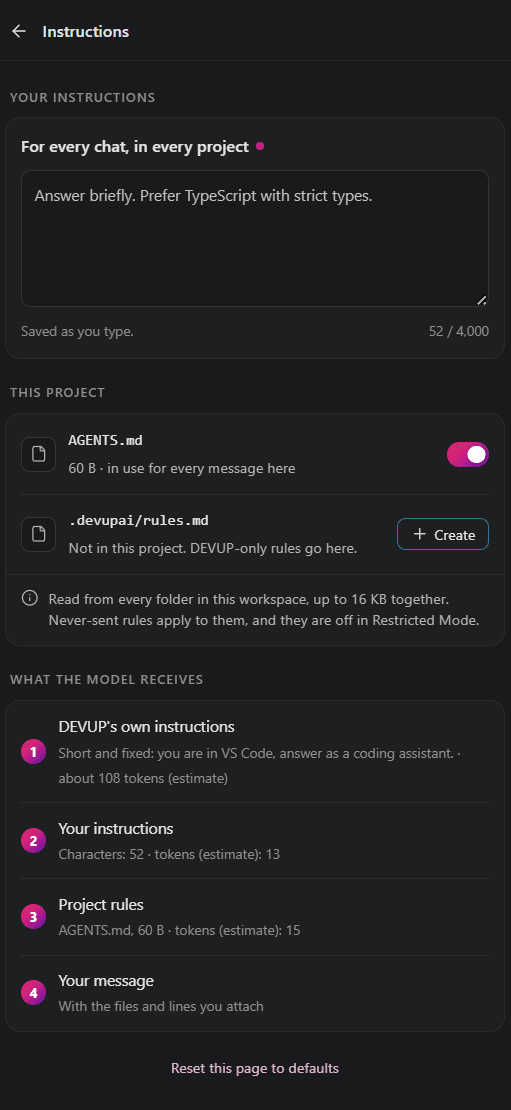
Your own instructions, in every project
In DEVUP AI Settings, write your instructions once, for example how short answers should be or which programming language you use. DEVUP AI sends them with every chat, whichever project you have open.
A few lines are enough. For example:
Answer briefly. Show the code first, then the reason for the change.
I write TypeScript and Python; match the language of the file I attach.
Prefer small functions with descriptive names over clever one-liners.
Project rules: AGENTS.md and .devupai/rules.md
Add an AGENTS.md, a .devupai/rules.md or both at the root of a workspace folder, and DEVUP AI reads them. In Settings, each file has its own switch, so you can turn either one off.
Use AGENTS.md for the conventions of the codebase itself, and .devupai/rules.md for rules meant only for DEVUP AI, such as how replies should be laid out.
Here is what these files could look like for a small TypeScript web app:
# Reading List

A small web app for keeping a reading list, written in TypeScript with React.

## Commands

- Install: `npm install`
- Run the tests: `npm test`
- Check types: `npm run typecheck`

## Code style

- TypeScript in strict mode. Avoid `any`.
- Functional React components with named exports, one per file in `src/components`.
- Keep data access in `src/api`, never inside components.

## Tests

- Add or update a test for every change in behaviour.
- Tests sit next to the code they cover, as `*.test.ts`.# Rules for DEVUP AI
- Explain the change in two or three sentences, then show the code.
- Put each changed file in its own code block, with the file path above it.
- Prefer small, focused changes over large rewrites.
- Ask before adding a new dependency.Compare
Where each instruction lives
| Source | Where it lives | What it covers | How to turn it off |
|---|---|---|---|
| Your instructions | The Instructions page of DEVUP AI Settings. | Every chat, in every project you open. | Change them in Settings, where you wrote them. |
AGENTS.md | The root of a workspace folder, committed with the code. | Messages sent while that workspace is open. | Its switch in Settings, or the rules chip's ✕ for your next message. |
.devupai/rules.md | A .devupai folder at the root of a workspace folder. | Rules for DEVUP AI only, in that workspace. | Its own switch, or the same chip's ✕. |
| Reply language | The devupai.chat.replyLanguage setting. | The language replies are written in. | Keep the default, which follows the language you write in. |
Walkthrough
How it works in practice: sharing team conventions
- At the root of the repository, add an
AGENTS.mdlike the sample above: the commands to run, the code style, and where tests go. - Commit it with the code, so every teammate who opens the repository with DEVUP AI has the same file read from the same place.
- In DEVUP AI Settings, open Instructions. The project section lists
AGENTS.mdwith its switch, and Create adds a.devupai/rules.mdif you also want rules only DEVUP AI follows. - On the same page, check the full list of what the model receives, in order, to confirm your file is part of it.
- Back in the chat, a chip above the message box names the rule files in use.
- For a quick question where the conventions don't matter, click the chip's ✕: the rules are left out of your next message.
What the model receives, in order
The model receives these parts in this order:
- DEVUP AI's own instructions
- The reply language
- Your instructions
AGENTS.md.devupai/rules.md
To see it for yourself, open the Instructions page in DEVUP AI Settings: it lists everything the model receives, in order.
Use cases
Ways teams and developers use instructions
Sharing team conventions through AGENTS.md. A team agrees on strict TypeScript, named exports and tests beside the code. Writing that down once in AGENTS.md saves everyone from repeating it in each prompt, and a newcomer reads the same file the assistant gets.
Personal preferences that travel with you. You like short answers with the code first. Put that in your own instructions and it applies in every repository you open, without adding anything to a project's files.
A workspace with several folders. Each folder in the workspace can carry its own AGENTS.md and .devupai/rules.md at its root. A copy tucked into a subfolder is not read, so keep the files at the top of each folder.
Test conventions for generated tests. Note your test runner and file naming in AGENTS.md. The rules also go with the editor actions, so Add Tests receives them too.
Discussing code in French. A team that talks about its code in French can make French the reply language, rather than following whichever language each question happens to be typed in.
Reply language and reply length
Pick the reply language with the devupai.chat.replyLanguage setting: match the language you write in, or use English, French or Arabic.
For each model, you can also set the longest reply it may write, up to that model's own limit.
Tips
Tips for project rules
- Save
AGENTS.mdbefore your next message. The saved file is what gets read, so edits still open in the editor are not used yet. - Place both files directly at the root of a workspace folder; nothing deeper in the tree is picked up.
- Short, concrete rules are easy to check against the Instructions page, which shows the whole picture the model receives.
- Keep secrets out of rule files: the model receives their contents along with DEVUP AI's own instructions and yours.
The docs page on instructions and project rules covers each setting in detail.
Protection
Staying in control of project rules
- Turn
AGENTS.mdor.devupai/rules.mdoff with its switch whenever you don't want it used. - In Restricted Mode, DEVUP AI doesn't read project rules or write to files; you can still chat and attach code for it to read.
FAQ
Questions and answers
Yes. It reads AGENTS.md and .devupai/rules.md at the root of each workspace folder. Each file has a switch in Settings, so you can turn either one off.
In DEVUP AI Settings, on the Instructions page. What you write there is sent with every chat, in every project.
First DEVUP AI's own instructions, then the reply language, then your instructions, then AGENTS.md, then .devupai/rules.md. The Instructions page in Settings lists them in that order.
No. Only the files at the root of each workspace folder are read. Move the file up to the folder's root to use it.
Yes. While rules are in use, a chip above the message box names them. Its ✕ leaves them out of your next message.
Yes. DEVUP AI reads the saved file, so changes that are still unsaved in the editor are not used.
Yes. Those editor actions, and Fix with DEVUP AI in Quick Fix, carry the same instructions and project rules as a message you type.
No. In Restricted Mode, DEVUP AI doesn't read project rules and doesn't write to files, but chatting and reading what you attach still work.
Related
Start coding with DEVUP Code
Create your DEVUP AI account, then sign in from the editor.


