 AI Code Editor
Cursor with DEVUP AI
Add DEVUP AI models to Cursor as custom models through its OpenAI API key and base URL settings.
System Architecture
How Cursor Connects to DEVUP AI
Configuration
Quick Setup in Cursor
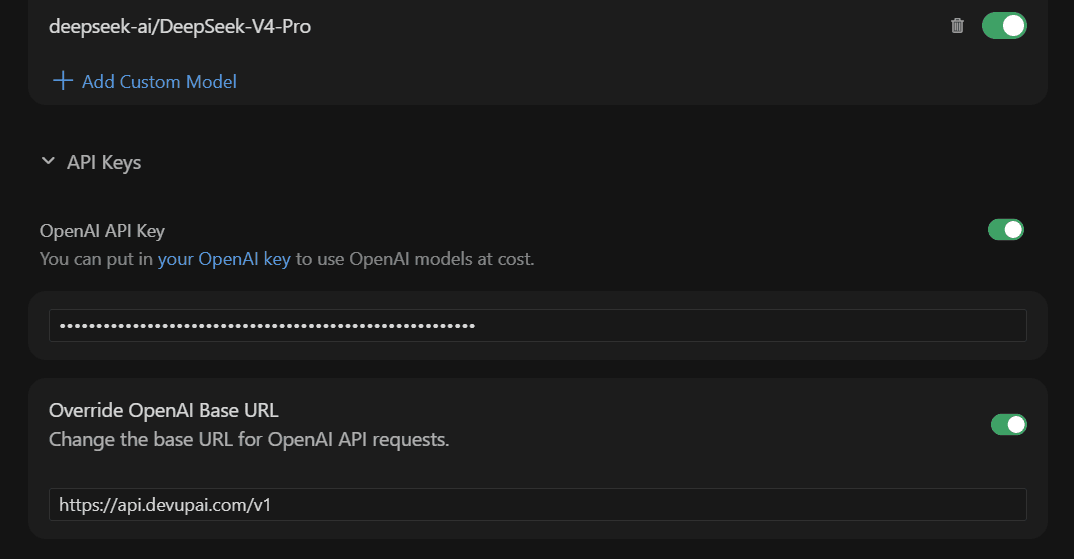
Add a custom model
In Settings → Models, choose Add Custom Model and enter the exact catalog ID, e.g. deepseek-ai/DeepSeek-V4-Pro
Turn on your API key
Under API Keys, turn on OpenAI API Key and paste your DEVUP AI key
Override the base URL
Turn on Override OpenAI Base URL and enter https://api.devupai.com/v1
Pick the model
Select the custom model in the chat model picker
Requirements
Paid Cursor Plan
Custom models require a paid Cursor plan. On the Free plan, Cursor shows "Named models unavailable" and only allows Auto.
Capabilities
What You Get
Chat with DEVUP AI models
Pick a DEVUP AI model in Cursor's model picker and chat with it.
Any catalog model
Add any DEVUP AI model ID as a custom model in Cursor.
One switch
Override OpenAI Base URL sends Cursor's OpenAI API requests to DEVUP AI; turn it off to switch back.
Local DZD billing
Metered billing in Algerian Dinar with BaridiMob, Edahabia, and CIB local payment support.


