 Coding Agent
DEVUP AI for Kilo Code
Run the Kilo Code agent in VS Code on DEVUP AI models. Add DEVUP AI as a custom OpenAI Compatible provider, pick a model from the list Kilo Code loads, and let it create files, edit code, and run terminal commands through tool calling.
System Architecture
How Kilo Code Connects to DEVUP AI
Kilo Code communicates directly with DEVUP AI via the OpenAI-compatible Chat Completions protocol on https://api.devupai.com/v1/chat/completions. The extension manages authentication with your DEVUP AI API key, loads available models, executes tools in your local workspace, and streams token deltas in real time.
Configuration
Quick Setup in Kilo Code
Add a custom provider
Open Settings via the gear icon (⚙️) in Kilo Code, navigate to Providers, and select add a custom provider.
OpenAI Compatible with Base URL and key
Set Provider API to OpenAI Compatible, enter https://api.devupai.com/v1 as the Base URL, and supply your DEVUP AI API key.
Pick the model
Kilo Code loads the DEVUP AI model list automatically. Select deepseek-ai/DeepSeek-V4-Pro from the list.
| Field | Value |
|---|---|
| Provider ID | devupai |
| Display name | DEVUP AI |
| Provider API | OpenAI Compatible |
| Base URL | https://api.devupai.com/v1 |
| API key | Your DEVUP AI key |
| Model | deepseek-ai/DeepSeek-V4-Pro |
In Action
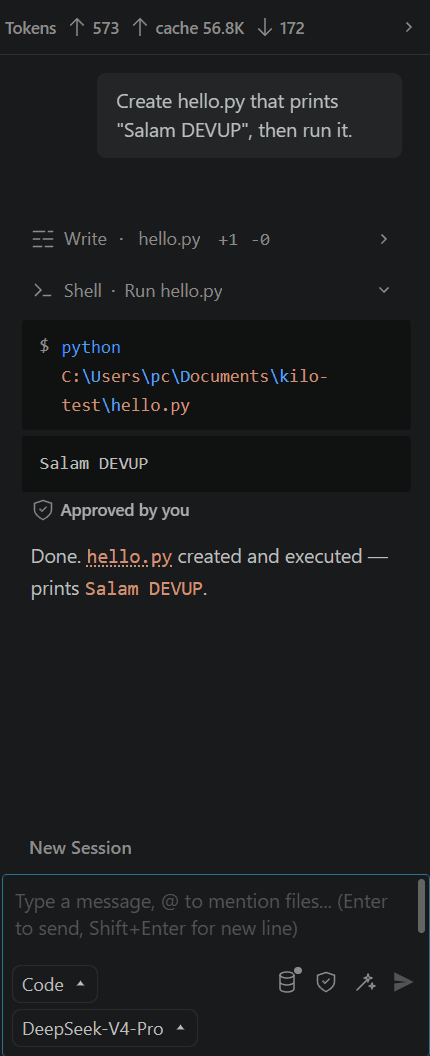
Kilo Code running on DEVUP AI
Capabilities
Supported Agent Capabilities
File edits and terminal commands
Kilo Code writes files and runs shell commands through tool calling on the OpenAI-compatible endpoint.
Model list from DEVUP AI
Kilo Code loads the DEVUP AI model list, so you pick a model instead of typing its ID.
Prompt caching
Kilo Code shows cached input tokens when requests reuse the DEVUP AI prompt cache.
Local DZD billing
Metered billing in Algerian Dinar with BaridiMob, Edahabia, and CIB local payment support.
Ready to Code with Kilo Code on DEVUP AI?
Create an API key in your dashboard, configure your OpenAI Compatible provider in Kilo Code, and start executing agentic coding workflows today.


