 Chat Interface
Open WebUI with DEVUP AI
Give your team a private chat on DEVUP AI models. Connect Open WebUI once, then chat with any model in the catalog and ask questions about your own documents.
System Architecture
How Open WebUI Connects to DEVUP AI
Configuration
Two Settings That Matter
Connection URL
Add it under Admin Panel → Settings → Connections → OpenAI API.
Embedding model
Set it under Admin Panel → Settings → Documents with the OpenAI engine.
In Action
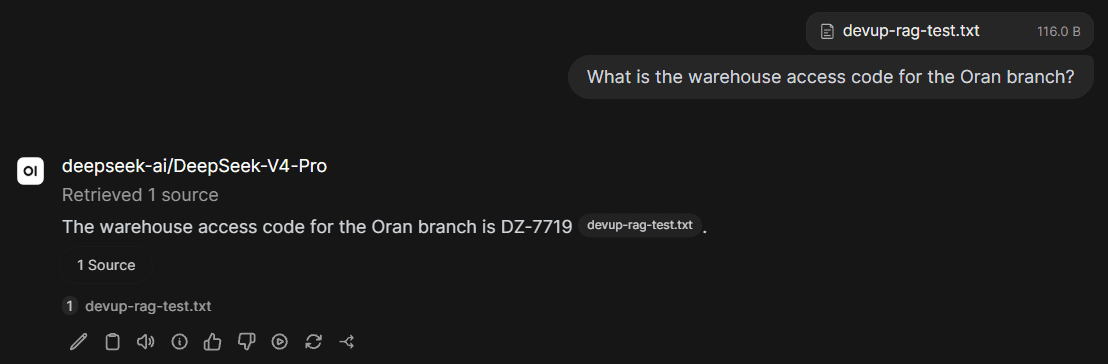
Answers From Your Documents
Capabilities
Supported Capabilities
Full model catalog
Every model in the DEVUP AI catalog appears in the Open WebUI model picker.
Document Q&A
Upload files and get answers with sources, using DEVUP AI embeddings.
Team model list
Choose which models your team sees with Model IDs on the connection.
Local DZD billing
Metered billing in Algerian Dinar with BaridiMob, Edahabia, and CIB local payment support.
FAQ
Open WebUI and DEVUP AI
Does Open WebUI work with DEVUP AI?
Yes. Add an OpenAI API connection with URL https://api.devupai.com/v1 and your DEVUP AI key, and the DEVUP AI models appear in the model picker.
Can Open WebUI answer questions from my documents with DEVUP AI?
Yes. Set the embedding engine to OpenAI with the DEVUP AI URL and key, and use BAAI/bge-m3 as the embedding model.
How is Open WebUI usage billed on DEVUP AI?
Every chat and embedding request is a regular DEVUP AI API call, metered in Algerian Dinar on your account.


