 Code Editor
DEVUP AI for Zed
Run the Zed agent, inline edits and chat on DEVUP AI models. Add one OpenAI-compatible provider in Zed's settings, then pick the model in the Agent Panel.
System Architecture
How Zed Connects to DEVUP AI
Configuration
Two Settings That Matter
API URL
Enter it with Add Provider in Zed's LLM Providers settings.
Model Name
Any DEVUP AI catalog ID works; set Max Tokens to its context_window from GET /v1/models.
In Action
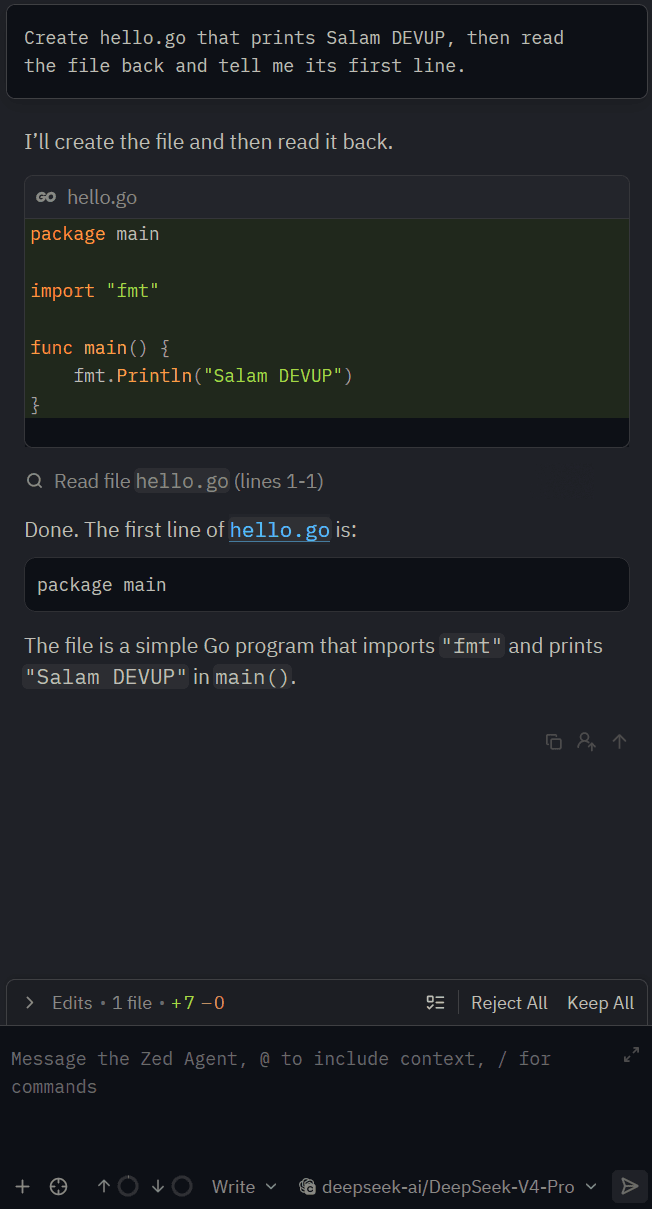
The Zed Agent Editing Files
Capabilities
Supported Capabilities
Agent with tools
The Zed agent creates, reads and edits files on DEVUP AI models.
Inline edits
Select code, press Ctrl+Enter, and change it in place.
Key in the keychain
Zed stores your DEVUP AI key in the system keychain, not in settings.json.
Local DZD billing
Metered billing in Algerian Dinar with BaridiMob, Edahabia, and CIB local payment support.
FAQ
Zed and DEVUP AI
Does Zed work with DEVUP AI?
Yes. Add an OpenAI-compatible provider in Zed's LLM Providers settings with the API URL https://api.devupai.com/v1 and your DEVUP AI key, then pick the model in the Agent Panel.
Can the Zed agent edit files with DEVUP AI models?
Yes. Keep Supports tools on and the Write profile selected, and the agent creates, reads and edits files in your project.
How is Zed usage billed on DEVUP AI?
Every request from Zed is a regular DEVUP AI API call, metered in Algerian Dinar on your account.


