 deepseek-ai /
DeepSeek-V4.1-Flash-1017
| Tier | Input | Output | Cached input |
|---|---|---|---|
PriorityLearn more | 105 | 315 | 3.15 |
FlexLearn more | 56 | 168 | 1.68 |
DeepSeek-V4.1-Flash-1017 is a multimodal reasoning model built for coding, agentic workflows, and visual understanding. This update improves published benchmark results over V4.1-Flash while reducing task completion time and output length in reported evaluations.

Use DeepSeek-V4.1-Flash-1017 in VS Code, Cursor and Antigravity
DEVUP Code, the DEVUP AI extension, is free to install. Requests are paid from your DEVUP balance.
DeepSeek-V4.1-Flash-1017

Stronger reasoning. Better code. More capable agents.
DeepSeek-V4.1-Flash-1017 refines the V4.1-Flash family for demanding reasoning, software engineering, agent workflows, and visual understanding. The update reports higher scores across all eleven evaluations in its release comparison, alongside shorter outputs and faster task completion under the reported evaluation conditions.
Use it through DEVUP AI with the exact model identifier:
deepseek-ai/DeepSeek-V4.1-Flash-1017Model Information
| Attribute | Details |
|---|---|
| Model | DeepSeek-V4.1-Flash-1017 |
| Family | DeepSeek V4.1 Flash |
| Release | October 17, 2026 |
| Primary task | Text generation |
| Native inputs | Text and images |
| Output | Text |
| Architecture | Multimodal Mixture-of-Experts with a Causal Encoder–Decoder design |
| Family backbone | 552B parameters; approximately 8B active during input processing and 16B during generation |
| Native context capacity | 1,048,576 tokens |
| License | MIT |
| DEVUP AI base URL | https://api.devupai.com/v1 |
| Chat endpoint | POST /v1/chat/completions |
The native context capacity describes the model architecture. The context and output limits actually served by DEVUP AI are the values in the live model catalog. The capability-check report dated October 17, 2026 records successful image input, tool calling, structured outputs, and on-request reasoning checks. Use the current catalog entry to select the endpoint and supported controls.
Architecture details come from the V4.1-Flash family model card; the exact context capacity is recorded in this release's configuration.
Capabilities Checked on DEVUP AI
The supplied capability-check report dated October 17, 2026 records the following observations. Each basic tool, image, or JSON scenario succeeded in two of two attempts; these are focused compatibility checks, not broad reliability evaluations.
| Capability | Observed behavior |
|---|---|
| Tool calling | Returned the requested function with parseable JSON arguments |
| Required tool choice | Honored tool_choice: "required" in the tested scenario |
| Named tool choice | Selected the specified function in the tested scenario |
| Image input | Read the target digits correctly in both image checks |
| Structured outputs | Returned JSON matching the tested json_schema |
| JSON mode | Returned a JSON object with response_format.type: "json_object" |
| Default reasoning behavior | No reasoning observed when no reasoning parameter was sent |
| On-request reasoning | Reasoning observed with reasoning_effort: "medium" and with reasoning.enabled: true |
| Reasoning output | Returned separately in the reasoning field in the tested responses |
| Reasoning usage | Reasoning-token counts reported in the tested reasoning responses |
| Reasoning disabled | reasoning_effort: "none" accepted without observed reasoning |
The report records none, low, medium, and high as catalog effort levels. Its detailed probes also accepted minimal, xhigh, and max, with reasoning observed for each. Acceptance does not demonstrate that those levels produce distinct reasoning depths; applications should use the levels advertised in the current catalog.
Audio and video input were not tested. No output ceiling was established by the probes: accepting a requested cap above the context capacity does not prove that the model can generate that many tokens. A documentation-based output override is mentioned in the report, but its numeric value is not included.
What Changed in 1017
- Reasoning: improved performance on Humanity’s Last Exam without tools.
- Software engineering: stronger results on terminal tasks, repository work, and program development.
- Agents: higher scores on automation and multi-step agent evaluations.
- Vision: gains on chart interpretation and visual problem-solving evaluations with tools.
- Task efficiency: the release reports completing evaluated tasks with less time and shorter outputs. No fixed latency or output reduction is guaranteed for an individual request.
Published Evaluation Results
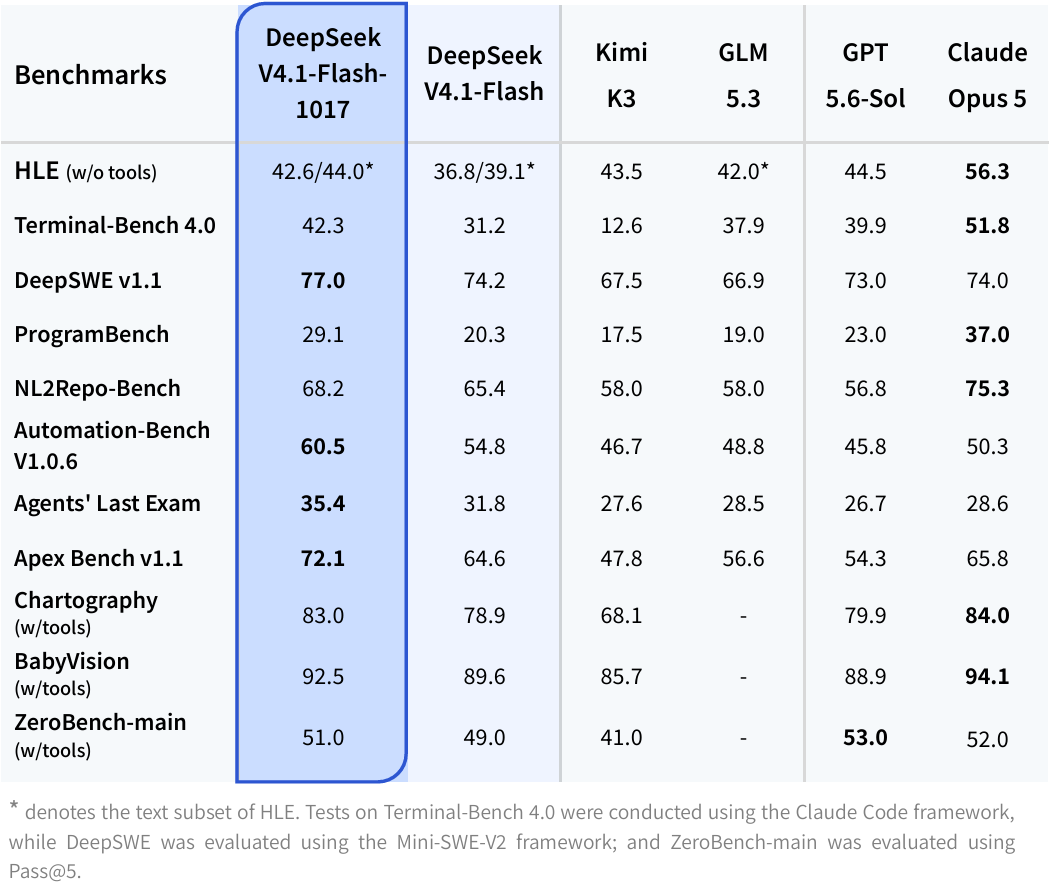
The table below isolates the change from the previous Flash release. Differences are absolute score points, not relative percentage improvements.
| Benchmark | V4.1-Flash | V4.1-Flash-1017 | Change |
|---|---|---|---|
| HLE without tools | 36.8 | 42.6 | +5.8 |
| Terminal-Bench 4.0 | 31.2 | 42.3 | +11.1 |
| DeepSWE v1.1 | 74.2 | 77.0 | +2.8 |
| ProgramBench | 20.3 | 29.1 | +8.8 |
| NL2Repo-Bench | 65.4 | 68.2 | +2.8 |
| Automation-Bench v1.0.6 | 54.8 | 60.5 | +5.7 |
| Agents’ Last Exam | 31.8 | 35.4 | +3.6 |
| Apex Bench v1.1 | 64.6 | 72.1 | +7.5 |
| Chartography with tools | 78.9 | 83.0 | +4.1 |
| BabyVision with tools | 89.6 | 92.5 | +2.9 |
| ZeroBench-main with tools | 49.0 | 51.0 | +2.0 |
Evaluation notes: these are published release results, not measurements performed by DEVUP AI. The HLE text-only subset scores are 39.1 for the previous release and 44.0 for 1017; they are distinct from the main HLE scores above. Terminal-Bench 4.0 uses the Claude Code harness; DeepSWE v1.1 uses Mini-SWE-V2. ZeroBench-main is evaluated with Pass@5. Tool-assisted visual results describe complete evaluation setups, not standalone image-question performance. Harnesses, tools, prompts, and generation settings affect results.
Source: release model card.
Best-Fit Workloads
| Workload | Practical applications |
|---|---|
| Coding | Explain unfamiliar code, investigate failures, propose patches, and draft tests |
| Agent development | Plan multi-step work and integrate with application-managed tools where enabled |
| Reasoning | Analyze constraints, compare implementation options, and solve technical problems |
| Long-context analysis | Work across supplied source files, specifications, and extended conversations |
| Visual understanding | Interpret screenshots, charts, and document images when image input is enabled |
For repository tasks, supply the relevant files, the observed behavior, the intended behavior, and the verification command. Ask the model to identify missing evidence before proposing a change. The application remains responsible for executing tools and checking generated code.
Quickstart with DEVUP AI
Create an API key in your DEVUP AI dashboard. Store it in DEVUP_API_KEY on your server. Keep it out of browser code and source control.
All examples below use the exact release ID. They illustrate the documented request contract; they are not recorded responses or benchmark reproductions.
cURL
With DEVUP_API_KEY set in your environment:
curl --fail-with-body https://api.devupai.com/v1/chat/completions \
  -H "Authorization: Bearer ${DEVUP_API_KEY}" \
  -H "Content-Type: application/json" \
  --data '{
    "model": "deepseek-ai/DeepSeek-V4.1-Flash-1017",
    "messages": [
      {
        "role": "system",
        "content": "You are a precise software engineering assistant. State missing evidence and return actionable findings."
      },
      {
        "role": "user",
        "content": "Design an idempotent webhook handler in TypeScript. Explain duplicate delivery handling and propose three meaningful tests."
      }
    ],
    "max_tokens": 8192
  }'
Reference: Chat Completions.
Python — OpenAI-Compatible Client
Install the client:
python -m pip install openaiimport os
from openai import OpenAI
client = OpenAI(
api_key=os.environ["DEVUP_API_KEY"],
base_url="https://api.devupai.com/v1",
)
response = client.chat.completions.create(
model="deepseek-ai/DeepSeek-V4.1-Flash-1017",
messages=[
{
"role": "user",
"content": (
"Review this function for correctness: "
"def average(values): return sum(values) / len(values). "
"Identify edge cases, propose a minimal fix, and give tests."
),
}
],
max_tokens=8192,
)
choice = response.choices[0]
answer = choice.message.content
if answer:
print(answer)
if choice.finish_reason == "length":
print("Output budget reached; the answer may be incomplete.")
elif not answer:
print("No visible text returned. Inspect response metadata.")Reference: OpenAI SDK integration.
JavaScript — Native DEVUP AI SDK with Streaming
Install the official SDK and save the example as example.mjs:
npm install devupaiimport DevupAI from "devupai";
const apiKey = process.env.DEVUP_API_KEY;
if (!apiKey) throw new Error("Set DEVUP_API_KEY before running this example.");
const client = new DevupAI({ apiKey });
const stream = await client.chat.completions.create({
model: "deepseek-ai/DeepSeek-V4.1-Flash-1017",
messages: [{
role: "user",
content: "Propose a concise implementation plan for a bilingual document search application. Include acceptance criteria.",
}],
max_tokens: 8192,
stream: true,
});
for await (const chunk of stream) {
const text = chunk.choices?.[0]?.delta?.content;
if (text) process.stdout.write(text);
}
process.stdout.write("\n");Run node example.mjs. Streaming clients must tolerate chunks without a choice or without visible text.
References: Node.js SDK · Streaming.
Enable Reasoning When Needed
Reasoning is optional in the reported checks. Using the Python client configured above, request the measured medium effort level explicitly:
response = client.chat.completions.create(
    model="deepseek-ai/DeepSeek-V4.1-Flash-1017",
    messages=[{
        "role": "user",
        "content": "Compare two retry strategies for an idempotent webhook consumer. State the assumptions and recommend one.",
    }],
    reasoning_effort="medium",
    max_tokens=8192,
)

choice = response.choices[0]
print(choice.message.content or "No visible answer returned.")
if choice.finish_reason == "length":
    print("Output budget reached; reasoning and the answer share that budget.")
The alternative body form {"reasoning": {"enabled": true}} also enabled reasoning in the supplied checks. With the OpenAI Python SDK, pass that form through extra_body instead of sending it alongside reasoning_effort:
response = client.chat.completions.create(
    model="deepseek-ai/DeepSeek-V4.1-Flash-1017",
    messages=[{"role": "user", "content": "Explain when retrying an operation is safe."}],
    extra_body={"reasoning": {"enabled": True}},
    max_tokens=8192,
)
print(response.choices[0].message.content or "No visible answer returned.")
To request an answer without reasoning, the tested explicit setting is reasoning_effort="none". Omitting reasoning controls also produced no reasoning in the default checks.
Reference: Reasoning controls.
Check Live Limits and Capabilities
Retrieve this model's catalog entry before configuring optional features. This example prints only the technical fields needed for integration:
import json
import os
from urllib.request import Request, urlopen

model_id = "deepseek-ai/DeepSeek-V4.1-Flash-1017"
request = Request(
    f"https://api.devupai.com/v1/models/{model_id}",
    headers={"Authorization": f"Bearer {os.environ['DEVUP_API_KEY']}"},
)
with urlopen(request, timeout=30) as response:
    model = json.load(response)

fields = (
    "id", "context_window", "max_output_tokens", "supports",
    "reasoning", "tool_calls", "tool_choice",
)
print(json.dumps(
    {field: model[field] for field in fields if field in model},
    indent=2,
))- Images: check
supports.visionbefore sending animage_urlcontent part. - Tools: check
supports.toolsandtool_calls.chat_completionsbefore choosing the tool-calling endpoint. - Structured outputs: check
supports.structured_outputbefore requesting strictjson_schemaoutput. A prompt asking for JSON does not establish schema enforcement. - Reasoning: use only the control parameter and values advertised in
reasoning. Do not assume that the model's native numeric settings are accepted by the public API. - Output budget: keep
max_tokenswithinmax_output_tokensand leave room for both reasoning and the final answer. A response ending withfinish_reason: "length"may have no visible answer if the budget was spent on reasoning.
References: Models · Reasoning controls.
Integration Notes
- Use the exact identifier. The dated release and the undated Flash model are separate catalog identifiers.
- Pass the necessary evidence. Include source material, task constraints, and success criteria; request explicit uncertainty when information is missing.
- Validate outputs. Compile generated code, run relevant tests, and validate extracted data against your application's rules.
- Keep tools under application control. Validate arguments and permissions before executing a model-requested action.
- Handle incomplete responses. Check completion status and preserve partial text when a stream is interrupted.
Documentation and Model Resources
- DEVUP AI Quickstart
- Chat Completions
- Tool Calling
- Structured Outputs
- Vision & OCR
- Release model card
- V4.1-Flash family technical report
- MIT license
Image Assets
The images embedded above use public HTTPS URLs and require no local attachments. The wordmark is the official asset; the benchmark figure is specific to the October 17 release.
Model information and documentation reviewed on October 17, 2026. Availability, served limits, and optional capabilities follow the current DEVUP AI catalog.


