 openai /
gpt-image-2.6-sunburst
- Text input: 1 750 DZD / 1M tokens
- Image input: 2 800 DZD / 1M tokens
OpenAI's GPT Image 2.6 model for detailed visual work: text-to-image and precise multi-step image editing, with dense readable text, transparent backgrounds, markup-guided edits and up to 16 reference images.

- Size
- 1024×1024 · 1536×1024 · 1024×1536, default 1024×1024
- Quality
- low · medium · high, default medium
- Complexity
- low · medium · high, default high
- Background
- auto · opaque · transparent, default auto
- Output format
- PNG · WebP · JPEG, default PNG
- Compression
- 0–100, default 100
- Images per request
- 1–10, default 1
- Input images
- 1 to 16 per edit
- Mask
- Accepted on edits
- Markup
- Accepted on edits
GPT Image 2.6 Sunburst
GPT Image 2.6 Sunburst is OpenAI's image model for detailed visual work. It turns a text prompt into an image, and edits your own photos from an instruction:
- dense compositions;
- text-heavy layouts;
- multi-step edits that keep every other detail in place.
OpenAI presents it as the model for higher-quality generation and greater consistency across edits, where editing precision matters most. It is ranked first on the Artificial Analysis text-to-image arena.
openai/gpt-image-2.6-sunburstAt a glance
| Developer | OpenAI |
| Model family | GPT Image 2.6 |
| Variant | Sunburst: tuned for detail and edit precision |
| Released | 4 November 2026 |
| Tasks on DEVUP AI | Text-to-image · image editing |
| Endpoints | POST /v1/images/generations · POST /v1/images/edits |
| Input | A text prompt, plus up to 16 images for an edit |
| Output | PNG, WebP or JPEG |
| Sizes | 1024x1024 · 1536x1024 · 1024x1536 |
| Quality | low · medium · high |
| Complexity | low · medium · high |
| Background | auto · opaque · transparent |
| Images per request | 1 to 10 |
| Defaults | 1024x1024, medium quality, high complexity, PNG |
Why GPT Image 2.6 Sunburst
- #1 in the arena. First on the Artificial Analysis text-to-image leaderboard at the time of writing, ahead of every other GPT Image model.
- Detail that holds. Built for dense scenes, small lettering, diagrams and slides, at
mediumandhighquality. - Edits that stay on target. Multi-step edits keep the face, the layout, the labels and the lighting you did not ask to change.
- Readable text in images. Posters, packaging, infographics and UI mockups, with the wording you write.
- Point at the change. With
markup, you circle the object on a transparent layer and say what to do with it. - Transparent cut-outs.
background: "transparent"with PNG or WebP gives product images ready for a store or an ad. - Up to 16 reference images. Combine a face, an outfit, a product and a style in one edit.
- Pair it with Flare. Draft fast on
openai/gpt-image-2.6-flare, then render the final here: only themodelchanges.
What it makes

Photorealism. Source: OpenAI image prompting guide.

A dense educational diagram with readable labels. Source: OpenAI image prompting guide.

A presentation slide with figures. Source: OpenAI image prompting guide.
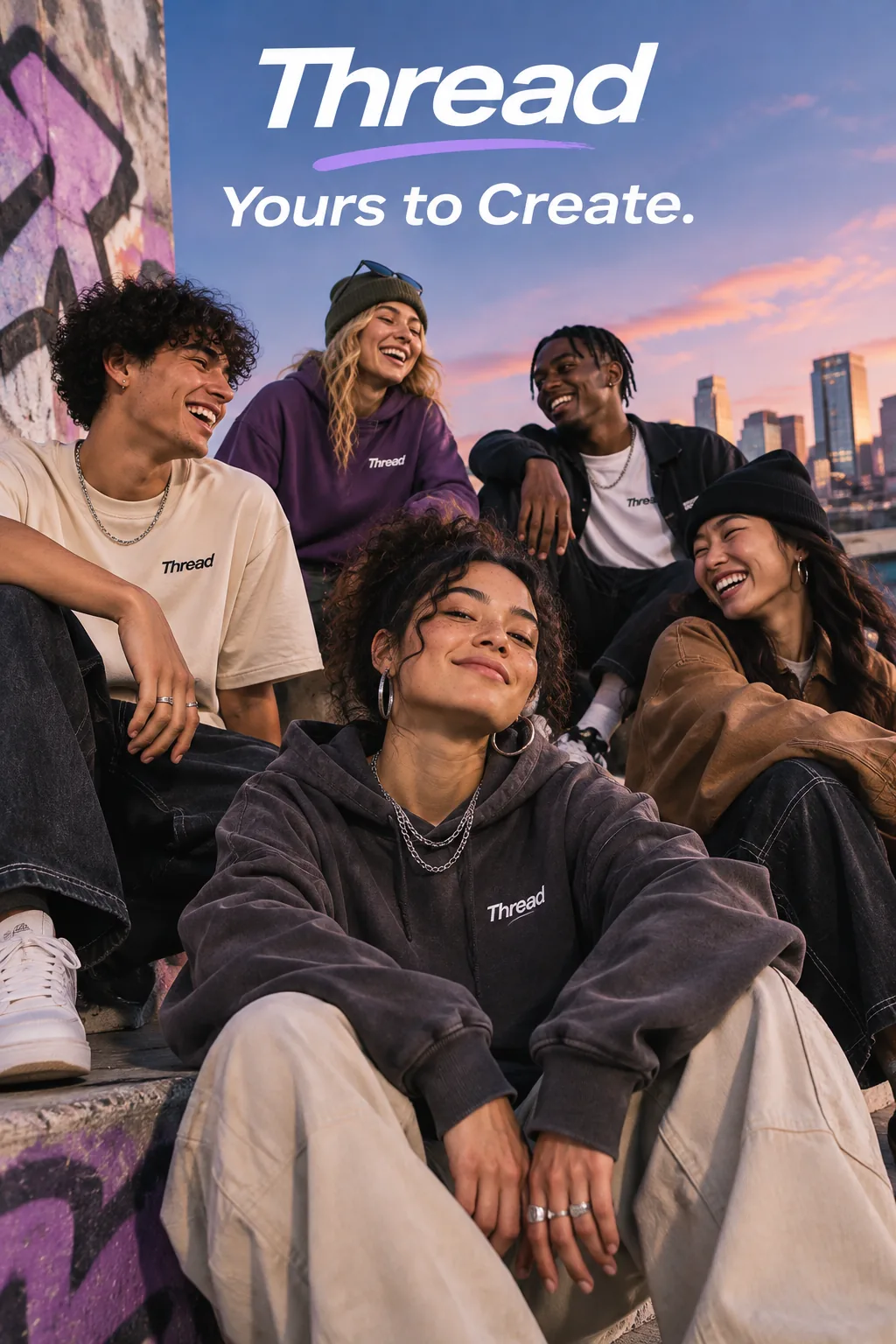
An ad with the tagline written in the prompt. Source: OpenAI image prompting guide.
Image options
Every option is optional. An option you leave out takes its default.
| Option | Values | Default | What it does |
|---|---|---|---|
size | 1024x1024, 1536x1024, 1024x1536 | 1024x1024 | Square, landscape or portrait |
quality | low, medium, high | medium | How much detail is rendered, such as texture and small lettering |
complexity | low, medium, high | high | How much the model plans the composition before rendering |
background | auto, opaque, transparent | auto | transparent needs png or webp |
output_format | png, webp, jpeg | png | The file format |
output_compression | 0 to 100 | 100 | Compression level, with jpeg or webp only |
n | 1 to 10 | 1 | Images per request |
response_format | url, b64_json | url | A link to the image, or the image in Base64 |
size: "auto" and quality: "auto" are accepted: they use the defaults above, and the response says so in _devup.warnings.
Choosing quality and complexity
- Quality is about detail. Sunburst shows its advantage at
mediumandhigh. Usehighfor small text, dense diagrams, slides and print. - Complexity is about planning.
highgives the model room to build the composition from a short prompt. For a targeted edit, start atlow: it changes one detail with fewer unwanted changes elsewhere. - Complexity does not change the price. Quality, size and the number of images do.


One prompt, three settings from low to high: more room to plan gives a richer composition. Source: OpenAI image prompting guide.
Quick start
cURL
curl -X POST 'https://api.devupai.com/v1/images/generations' \
  -H "Authorization: Bearer $DEVUP_API_KEY" \
  -H "Content-Type: application/json" \
  -d '{
    "model": "openai/gpt-image-2.6-sunburst",
    "prompt": "An infographic titled \"How solar panels work\". Four labeled steps from sunlight to the home socket, clean flat icons, white background, readable labels in English.",
    "size": "1024x1536",
    "quality": "high"
  }'
Python
import base64
import os
import requests

response = requests.post(
    "https://api.devupai.com/v1/images/generations",
    headers={
        "Authorization": f"Bearer {os.environ['DEVUP_API_KEY']}",
        "Content-Type": "application/json",
    },
    json={
        "model": "openai/gpt-image-2.6-sunburst",
        "prompt": "Packaging mockup of an olive oil bottle. Label text: \"Huile d'olive extra vierge — Kabylie\". Dark green glass, soft studio light, no other text.",
        "size": "1024x1536",
        "quality": "high",
        "output_format": "webp",
        "output_compression": 90,
        "response_format": "b64_json",
    },
    timeout=240,
)

result = response.json()
if response.status_code != 200:
    raise RuntimeError(result["error"]["message"])

with open("olive-oil.webp", "wb") as f:
    f.write(base64.b64decode(result["data"][0]["b64_json"]))

print(result["usage"], result["_devup"])
JavaScript (Node.js)
import { writeFile } from "node:fs/promises";

const response = await fetch("https://api.devupai.com/v1/images/generations", {
  method: "POST",
  headers: {
    Authorization: `Bearer ${process.env.DEVUP_API_KEY}`,
    "Content-Type": "application/json",
  },
  body: JSON.stringify({
    model: "openai/gpt-image-2.6-sunburst",
    prompt: "A landing page hero for a fintech app: phone mockup showing a balance in DZD, headline \"Pay in dinars\", calm blue palette.",
    size: "1536x1024",
    quality: "medium",
  }),
});

const result = await response.json();
if (!response.ok) throw new Error(result.error.message);

const file = await fetch(result.data[0].url);
await writeFile("hero.png", Buffer.from(await file.arrayBuffer()));
console.log(result._devup);
Response
{
  "created": 1794316800,
  "data": [
    {
      "url": "<image-url>"
    }
  ],
  "size": "1536x1024",
  "quality": "medium",
  "output_format": "png",
  "background": "auto",
  "usage": {
    "input_tokens": "<tokens>",
    "input_tokens_details": { "text_tokens": "<tokens>", "image_tokens": 0 },
    "output_tokens": "<tokens>",
    "output_tokens_details": { "text_tokens": 0, "image_tokens": "<tokens>" },
    "total_tokens": "<tokens>"
  },
  "_devup": {
    "cost_dzd": "<cost_dzd>",
    "balance_dzd": "<balance_dzd>",
    "request_id": "req_<id>"
  }
}size,quality,output_formatandbackgroundare the values the image was made with, defaults included.usageis the token count the request was billed on.data[i].urlis a signed link. Download the image right away rather than storing the link. Send"response_format": "b64_json"to receive the image in the response instead._devupgives:cost_dzd: what the request cost;balance_dzd: your remaining balance;request_id: the id to quote to support.
Editing images
Send the images to POST /v1/images/edits. Up to 16 images (PNG, JPEG or WebP) can be sent as files, https links or data URIs.
- The first image is the one to edit.
- The others are references: a face, a product, an outfit, a style.
Dress a person from reference images
curl -X POST 'https://api.devupai.com/v1/images/edits' \
  -H "Authorization: Bearer $DEVUP_API_KEY" \
  -F model="openai/gpt-image-2.6-sunburst" \
  -F prompt="Image 1 is the person. Dress her in the jacket from image 2, the top from image 3 and the boots from image 4. Keep her face, hair, pose and the museum background exactly the same." \
  -F "image[]=@woman.png" \
  -F "image[]=@jacket.png" \
  -F "image[]=@top.png" \
  -F "image[]=@boots.png"
A person dressed from separate clothing references. Source: OpenAI image prompting guide.
Point at the change with markup
markup is a transparent PNG the size of the first image. You draw on it (for example, a circle around an object), and the prompt says what to do there. markup and mask cannot be sent together.
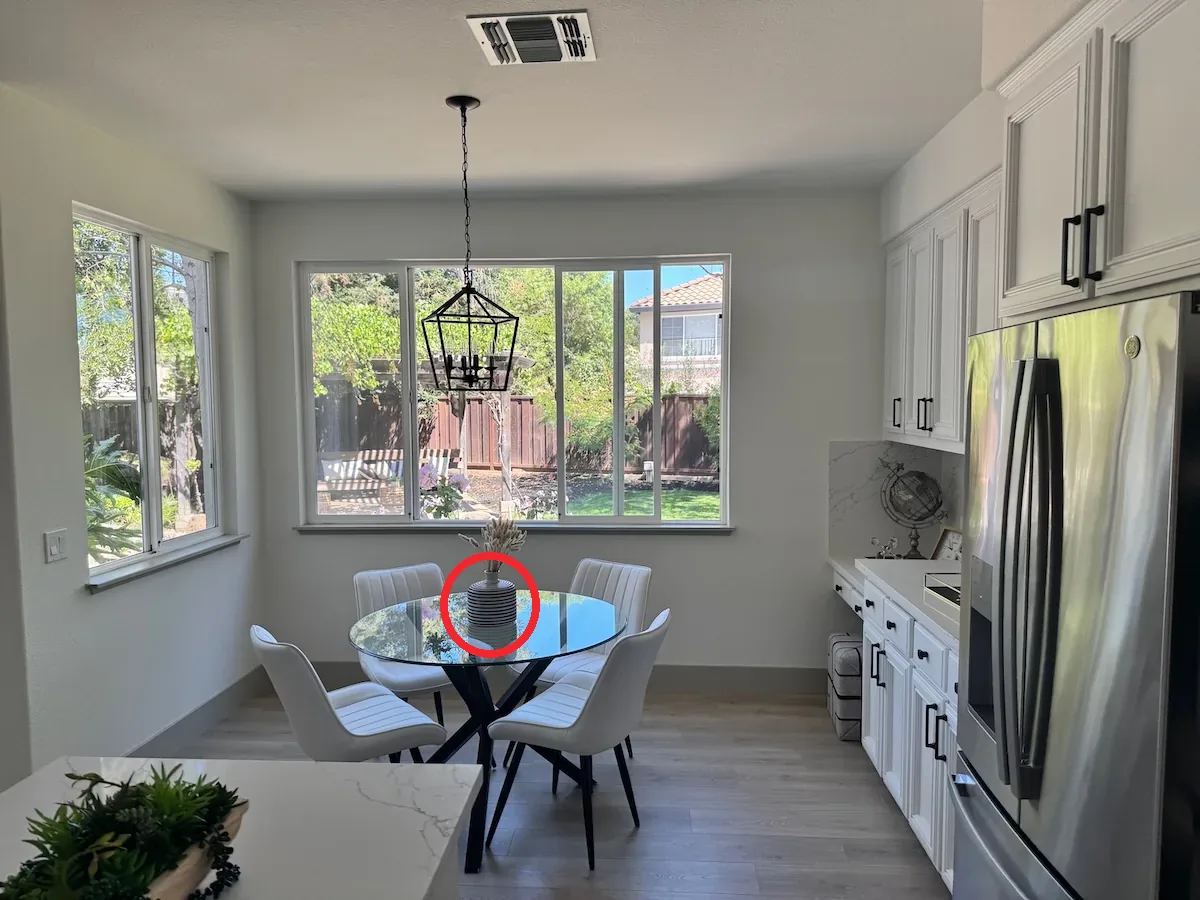

Before and after a markup edit: "make the circled vase cobalt blue". Source: OpenAI image prompting guide.
curl -X POST 'https://api.devupai.com/v1/images/edits' \
  -H "Authorization: Bearer $DEVUP_API_KEY" \
  -F model="openai/gpt-image-2.6-sunburst" \
  -F prompt="Make the circled vase cobalt blue. Change nothing else." \
  -F complexity="low" \
  -F "image[]=@kitchen.png" \
  -F "markup=@circle.png"
Edit inside a mask
A mask is a PNG with an alpha channel, the size of the first image. Its transparent area is the part the model may change.
curl -X POST 'https://api.devupai.com/v1/images/edits' \
  -H "Authorization: Bearer $DEVUP_API_KEY" \
  -F model="openai/gpt-image-2.6-sunburst" \
  -F prompt="Replace the sky with a warm sunset." \
  -F "image[]=@street.png" \
  -F "mask=@sky-mask.png"
Product cut-outs

A product extracted from a photo onto a transparent background. Source: OpenAI image prompting guide.
curl -X POST 'https://api.devupai.com/v1/images/edits' \
  -H "Authorization: Bearer $DEVUP_API_KEY" \
  -F model="openai/gpt-image-2.6-sunburst" \
  -F prompt="Extract the bottle onto a transparent background. Keep its shape, label and colors exactly." \
  -F background="transparent" \
  -F output_format="png" \
  -F "image[]=@shampoo-photo.jpg"
Billing
- What you pay for: the tokens the model reports, at the rates shown at the top of this page:
- text input (your prompt);
- image input (the images you send for an edit);
- image output (the images generated).
- The response shows them: the counts are in
usage, and the cost in_devup.cost_dzd. - What changes the price: quality, size and
n, because they change the image tokens.complexity,backgroundand the format do not. - Before generation: an estimate is reserved on your balance. The part that is not billed is returned.
- When nothing is delivered: a request that returns no image is not charged.
- Find the shot on Flare. Same request, same options: draft on
openai/gpt-image-2.6-flare, then render the final here.
Errors
Every option is checked before anything is generated. A request the model cannot take returns HTTP 400, and nothing is charged.
A value the model does not offer returns invalid_value, and the message lists what is available:
{
  "error": {
    "message": "`quality` \"ultra\" is not available on this model. Available: low, medium, high.",
    "type": "devup_error",
    "code": "invalid_value"
  }
}
Other cases:
- A combination the model does not accept also returns HTTP 400, and the message says what is allowed. Examples:
background: "transparent"withjpeg,output_compressionwithpng,markuptogether withmask. stream: truereturnsunsupported_parameter: images come back in one response.- HTTP 402: a request your balance cannot cover, returned before anything is generated or downloaded.
Full reference: Image generation and Errors.
Writing prompts that work
OpenAI's prompting guide for GPT Image recommends:
- Name the subject and the use. A product photograph, an advertisement, a diagram.
- Organize long prompts. Use labeled parts: scene, subject, details, constraints.
- Quote the text you want in the image.
- Say where it goes and in which style.
- Spell unusual names letter by letter.
- Ask for no other text.
- If small text is hard to read, compare
mediumandhighquality.
- For edits, say what changes and what stays. Change only the color of the vase. Keep the layout, lighting and labels.
- Give each image a role. Image 1 is the person, image 2 is the jacket, image 3 is the style.
- Restate what must not change in follow-up edits if the result drifts.
Example
A one-page menu for a café in Oran. Title at the top: "Café El Bahia". Three sections, Coffee, Pastries and Juices, each with four items and prices in DZD. Warm paper texture, clean serif typography, no other text.
Source: OpenAI image prompting guide.
Sunburst or Flare?
| GPT Image 2.6 Sunburst | GPT Image 2.6 Flare | |
|---|---|---|
| Tuned for | Detail and edit precision | Speed and iteration |
| Arena (AA text-to-image) | #1 · Elo 1259 | #2 · Elo 1228 |
| Options | The same | The same |
| Best for | Final renders, dense text, multi-step edits | Drafts, variations, quick edits, volume |
The request is the same on both: switch the model and keep the rest.
About the model
GPT Image 2.6 is OpenAI's image generation family released on 4 November 2026, in two models: Sunburst, "image generation and editing for detailed visual work", and Flare, "for fast iteration".
Both models take text and images as input and return images. Images 2.6 introduced:
- a
complexitysetting that controls how much the model plans an image; - markup-guided edits.
OpenAI reports the family generates images 50% faster than before. It has not published an architecture or a parameter count.
Benchmarks
On the Artificial Analysis text-to-image arena (AA-Image-T2I v2.1), viewers compare two images without knowing which model made which. GPT Image 2.6 Sunburst holds an Elo of 1259 (95% confidence interval ±15, 4,947 samples). It ranks 1st, at the time of writing.
The arena scores are measured at OpenAI's max quality level.
| Model | Elo |
|---|---|
| GPT Image 2.6 Sunburst | 1259 |
| GPT Image 2.6 Flare | 1228 |
| GPT Image 2.5 Sunburst | 1227 |
| GPT Image 2.5 Flare | 1208 |
| GPT Image 2 | 1188 |
Live leaderboard: Artificial Analysis text-to-image.
Best use cases
- Final ad and campaign visuals: headlines and product details rendered cleanly.
- Infographics, slides and diagrams: dense layouts with many readable labels.
- Packaging and menus: exact wording, in the place you ask for.
- Precise photo edits: recolor, remove, replace or restyle one element, and keep the rest.
- Fashion and e-commerce: a model dressed from product photos, products cut out on transparent backgrounds.
Limitations
- Three sizes on this model: 1024×1024, 1536×1024 and 1024×1536.
- Three quality levels:
low,mediumandhigh. - PNG, WebP and JPEG output. Animated and vector outputs are not available on this model.
- Check text and fine detail. Spelling, small lettering and exact layouts are strong but not guaranteed. Review them before publishing.
- Higher complexity can add changes. For an edit, start at
complexity: "low"and restate what must stay the same. - Slower than Flare. Sunburst is tuned for detail. Use Flare when speed matters more.
- Generated images can reflect societal biases, and requests are subject to OpenAI's content policies. Review prompts and outputs before publishing.


