 moonshotai /
Kimi-K3.1-Pro
| Tier | Input | Output | Cached input |
|---|---|---|---|
PriorityLearn more | 1050 | 5250 | 105 |
FlexLearn more | 560 | 2800 | 56 |
Kimi K3.1 Pro is an open-weight multimodal model designed for advanced coding, complex reasoning, and long-running agentic workflows. Its mixture-of-experts architecture combines 2.8 trillion total parameters with 104 billion active parameters. With a native 1-million-token context window, it is built for working across large codebases, extensive documents, and visually rich tasks, including financial research and code-driven 3D creation.


Use Kimi-K3.1-Pro in VS Code, Cursor and Antigravity
DEVUP Code, the DEVUP AI extension, is free to install. Requests are paid from your DEVUP balance.

Kimi K3.1 Pro
Advanced reasoning · Visual understanding · Document intelligence · Function calling
Kimi K3.1 Pro combines an open-weight, multimodal architecture with a one-million-token context window. On DEVUP AI, its verified integration brings together text generation, controllable reasoning, image understanding, PDF input, structured responses, and function calling through a single Chat Completions endpoint.
Use it to turn a document into structured data, interpret an image, work through a technical question, or continue a conversation with information returned by your own tools.
2.8T total parameters · 104B active parameters · 1M context · Text, image, and PDF input · Text output
Quickstart · Reasoning · Tools · Images · PDF · Benchmarks
Model at a glance
| Specification | Value |
|---|---|
| Model ID | moonshotai/Kimi-K3.1-Pro |
| Endpoint | POST https://api.devupai.com/v1/chat/completions |
| Base URL | https://api.devupai.com/v1 |
| Architecture | Mixture-of-Experts, or MoE |
| Total parameters | 2.8 trillion |
| Active parameters | 104 billion |
| Declared context window | 1,048,576 tokens |
| Declared maximum output ceiling | 1,048,576 tokens, subject to remaining context |
| Verified input formats | Text, inline PNG image, inline PDF document |
| Output | Text, including JSON and function-call arguments |
| Reasoning controls used on DEVUP AI | none, low, high, max |
| Streaming | Server-Sent Events |
The context window is shared by the input and generated output, including reasoning tokens. A one-million-token output ceiling does not provide an additional million tokens beyond the context window. Set a request-level output budget appropriate to the task; the examples below use 4096.
Verified integration capabilities
| Capability | Observed behavior on DEVUP AI |
|---|---|
| Text generation | Returned a complete answer with finish_reason: "stop" |
| Reasoning | Returned reasoning_content and reasoning-token usage |
| Reasoning disabled | reasoning_effort: "none" returned an answer with zero reported reasoning tokens |
| Streaming | Delivered reasoning and answer deltas, completion status, and a final usage chunk |
| Automatic tool choice | Returned a named function call with valid JSON arguments |
| Required tool use | Honored tool_choice: "required" |
| Named tool choice | Honored an explicitly selected function |
| Tool-result continuation | Used the supplied tool result to produce the expected final answer |
| JSON mode | Returned a valid JSON object with the expected fields and values |
| JSON Schema | Returned an object matching the small schema used in verification |
| Image understanding | Read a random image code and identified shapes, positions, and colors |
| PDF input | Read a one-page text PDF, extracted its values, and calculated the correct total |
These checks establish the specific integration behaviors described here. The published benchmark figures later on this page describe separate model evaluations.
Quickstart
Authenticate with your DEVUP AI API key and use the model identifier exactly as shown.
Configure your API key
Bash / zsh
export DEVUP_API_KEY="YOUR_DEVUP_API_KEY"PowerShell
$env:DEVUP_API_KEY = "YOUR_DEVUP_API_KEY"cURL
1. Request body — save as request.json
{
  "model": "moonshotai/Kimi-K3.1-Pro",
  "messages": [
    {
      "role": "user",
      "content": "Reply with OK."
    }
  ],
  "reasoning_effort": "low",
  "max_tokens": 4096,
  "stream": false
}
2. Send the request — Bash / zsh
curl --request POST "https://api.devupai.com/v1/chat/completions" \
  --connect-timeout 20 \
  --max-time 300 \
  --header "Authorization: Bearer $DEVUP_API_KEY" \
  --header "Content-Type: application/json" \
  --data-binary @request.json
Read the final answer from choices[0].message.content. When reasoning is enabled, the associated reasoning text is returned separately in choices[0].message.reasoning_content.
Python
1. Shared client — save as devup_client.py
This helper uses the Python standard library. Save it once; every Python example below imports complete from this file. Place the example scripts in the same directory.
import json
import os
from urllib.error import HTTPError
from urllib.request import Request, urlopen

MODEL = "moonshotai/Kimi-K3.1-Pro"
ENDPOINT = "https://api.devupai.com/v1/chat/completions"


def complete(messages, **options):
    payload = {
        "model": MODEL,
        "messages": messages,
        "reasoning_effort": "low",
        "max_tokens": 4096,
        "stream": False,
        **options,
    }
    request = Request(
        ENDPOINT,
        data=json.dumps(payload).encode("utf-8"),
        headers={
            "Authorization": f"Bearer {os.environ['DEVUP_API_KEY']}",
            "Content-Type": "application/json",
        },
        method="POST",
    )

    try:
        with urlopen(request, timeout=300) as response:
            return json.load(response)
    except HTTPError as error:
        detail = error.read().decode("utf-8", errors="replace")
        request_id = error.headers.get("x-request-id", "unavailable")
        raise RuntimeError(
            f"HTTP {error.code}; request_id={request_id}; body={detail}"
        ) from error
2. Make a request — save as quickstart.py
from devup_client import complete

response = complete([
    {"role": "user", "content": "Reply with OK."}
])

print(response["choices"][0]["message"]["content"])
3. Run the example
python quickstart.pyExpected answer
OKThe helper explicitly selects low reasoning and allows up to 300 seconds for the request.
JavaScript
Request — save as quickstart.mjs
The same request can be sent with fetch in a Node.js ES module.
const response = await fetch(
  "https://api.devupai.com/v1/chat/completions",
  {
    method: "POST",
    signal: AbortSignal.timeout(300_000),
    headers: {
      Authorization: `Bearer ${process.env.DEVUP_API_KEY}`,
      "Content-Type": "application/json",
    },
    body: JSON.stringify({
      model: "moonshotai/Kimi-K3.1-Pro",
      messages: [{ role: "user", content: "Reply with OK." }],
      reasoning_effort: "low",
      max_tokens: 4096,
      stream: false,
    }),
  },
);

const result = await response.json();

if (!response.ok) {
  throw new Error(
    JSON.stringify({
      status: response.status,
      request_id: response.headers.get("x-request-id"),
      error: result.error,
    }),
  );
}

console.log(result.choices[0].message.content);
Run the example
node quickstart.mjsExpected answer
OKControl reasoning
Set reasoning_effort as a top-level request field. Keep the reasoning channel separate from the final answer when consuming the response.
| Value | Verified behavior |
|---|---|
none | Returned the answer with empty reasoning content and zero reported reasoning tokens |
low | Returned reasoning content and a final answer |
high | Returned reasoning content and a final answer |
max | Returned reasoning content and a final answer |
Request an answer without reported reasoning
Python — reasoning_off.py
from devup_client import complete

response = complete(
    [{"role": "user", "content": "What is the least common multiple of 1 through 12?"}],
    reasoning_effort="none",
)

message = response["choices"][0]["message"]
usage = response["usage"]

print(message["content"])
print(usage.get("completion_tokens_details", {}).get("reasoning_tokens"))
Observed verification values
Answer: 27,720
Reported reasoning tokens: 0
The answer was correct, the returned reasoning content was empty, and the usage reported zero reasoning tokens.
Read reasoning and answer fields separately
Python — reasoning_channels.py
from devup_client import complete

response = complete(
    [{"role": "user", "content": "Explain why the least common multiple of 1 through 12 is 27720."}],
    reasoning_effort="high",
)

message = response["choices"][0]["message"]
reasoning = message.get("reasoning_content") or ""
answer = message.get("content") or ""

print(answer)
print(f"Reasoning characters returned: {len(reasoning)}")
Reasoning tokens are part of the completion budget. The output limit should leave room for both the reasoning and the final answer.
Stream the response
Set stream: true and consume the response as Server-Sent Events. Use an unbuffered client to display incoming events as they arrive.
Streaming request — Bash / zsh
curl --no-buffer --request POST \
  "https://api.devupai.com/v1/chat/completions" \
  --connect-timeout 20 \
  --max-time 300 \
  --header "Authorization: Bearer $DEVUP_API_KEY" \
  --header "Content-Type: application/json" \
  --data '{
    "model": "moonshotai/Kimi-K3.1-Pro",
    "messages": [{"role": "user", "content": "Reply with OK."}],
    "reasoning_effort": "low",
    "max_tokens": 4096,
    "stream": true
}'| Event field | How to consume it |
|---|---|
choices[0].delta.reasoning_content | Append to the reasoning channel when present |
choices[0].delta.content | Append to the visible answer when present |
choices[0].finish_reason | Read the completion status when populated |
usage with an empty choices array | Read token totals from the final usage event |
data: [DONE] | Mark the stream as complete |
An initial event may contain the assistant role and empty content. Keep reading until content, completion status, and the stream terminator arrive. An empty choices array in a usage event is expected and should be handled before accessing choices[0].
Response excerpt — selected fields from a successful stream
Event metadata and earlier reasoning deltas are omitted here to show the answer and completion sequence.
data: {"choices":[{"delta":{"content":"OK"},"finish_reason":null}]}

data: {"choices":[{"delta":{"content":null},"finish_reason":"stop"}]}

data: {"choices":[],"usage":{"prompt_tokens":93,"completion_tokens":28,"total_tokens":121}}

data: [DONE]
Connect your own tools
Function calling lets the model ask your application for information. Your application executes the function and sends its result back into the conversation.
The verified round trip used a synthetic weather function: the model requested data for Algiers, received a temperature of 22, and returned 22 as the final answer.
Choose how a function is called
tool_choice | Verified use |
|---|---|
"auto" | The model selected the supplied function when instructed to retrieve its data |
"required" | The model returned a function call |
| Named-function object | The model called the explicitly selected function |
"none" | The continuation answered from the supplied tool result without another call |
Named-function selection — JSON configuration
Use this object as the value of tool_choice:
{
  "type": "function",
  "function": {
    "name": "get_test_weather"
  }
}
A complete function-call round trip
This example uses synthetic data so the function result is deterministic.
Python — tool_roundtrip.py
import json
from devup_client import complete

tools = [{
    "type": "function",
    "function": {
        "name": "get_test_weather",
        "description": "Return synthetic weather data for an integration example.",
        "parameters": {
            "type": "object",
            "properties": {"city": {"type": "string"}},
            "required": ["city"],
            "additionalProperties": False,
        },
    },
}]

messages = [{
    "role": "user",
    "content": "Call get_test_weather for Algiers. Do not invent the tool result.",
}]

first = complete(messages, tools=tools, tool_choice="required")
assistant = first["choices"][0]["message"]

# Preserve the complete returned message, including reasoning and tool calls.
messages.append(assistant)

calls = assistant.get("tool_calls") or []
if not calls:
    raise RuntimeError("Expected a function call.")

for call in calls:
    function = call["function"]
    arguments = json.loads(function["arguments"])

    if function["name"] != "get_test_weather":
        raise ValueError("Unexpected function name.")
    if arguments != {"city": "Algiers"}:
        raise ValueError("Unexpected function arguments.")

    messages.append({
        "role": "tool",
        "tool_call_id": call["id"],
        "content": json.dumps({
            "city": "Algiers",
            "temperature_c": 22,
            "source": "synthetic_test_data",
        }),
    })

messages.append({
    "role": "user",
    "content": "What temperature did the test tool return? Answer with the number only.",
})

final = complete(messages, tools=tools, tool_choice="none")
print(final["choices"][0]["message"]["content"])
Expected final answer
22Preserve the complete assistant message when continuing the exchange. In particular, keep reasoning_content, tool_calls, and each call ID, then return the matching tool_call_id with the tool result. This is the message-preservation pattern used in the successful verification.
Produce structured data
Use JSON mode when the application expects a JSON object. Use a JSON Schema when it also needs an explicit object structure.
JSON mode
Python — json_mode.py
import json
from devup_client import complete

response = complete(
    [{
        "role": "user",
        "content": 'Return exactly one JSON object with city="Algiers" and count=3. No other fields.',
    }],
    response_format={"type": "json_object"},
)

data = json.loads(response["choices"][0]["message"]["content"])
assert data == {"city": "Algiers", "count": 3}
print(data)
Verified response content — JSON
{
  "city": "Algiers",
  "count": 3
}
JSON Schema
The following small schema was used successfully in verification with strict: true.
Python — structured_output.py
import json
from devup_client import complete

schema = {
    "type": "object",
    "properties": {
        "city": {"type": "string", "enum": ["Algiers"]},
        "count": {"type": "integer", "enum": [3]},
    },
    "required": ["city", "count"],
    "additionalProperties": False,
}

response = complete(
    [{
        "role": "user",
        "content": 'Return city="Algiers" and count=3 using the supplied schema.',
    }],
    response_format={
        "type": "json_schema",
        "json_schema": {
            "name": "integration_test",
            "strict": True,
            "schema": schema,
        },
    },
)

data = json.loads(response["choices"][0]["message"]["content"])
assert set(data) == {"city", "count"}
assert data["city"] == "Algiers"
assert type(data["count"]) is int and data["count"] == 3
print(data)
Verified response content — JSON
{
  "city": "Algiers",
  "count": 3
}
Parse the final content field as JSON. Keep reasoning text outside the JSON parser, and validate the returned values before using them in application logic.
Work with images
Send an inline image in an image_url content part alongside the text instruction. The verified path used a PNG encoded as a Base64 data URL.
Request — Python, vision.py
Place image.png beside the script, or change the path to your own PNG file.
import base64
from pathlib import Path
from devup_client import complete

image_bytes = Path("image.png").read_bytes()
image_data = base64.b64encode(image_bytes).decode("ascii")

response = complete([{
    "role": "user",
    "content": [
        {
            "type": "text",
            "text": (
                "Read the verification code in the image exactly. "
                "Identify the two colored shapes from left to right. "
                "Return only JSON with code, left_shape, left_color, "
                "right_shape, and right_color."
            ),
        },
        {
            "type": "image_url",
            "image_url": {
                "url": f"data:image/png;base64,{image_data}",
            },
        },
    ],
}])

print(response["choices"][0]["message"]["content"])
What the image check established
The verification image contained a random code, a red rectangle on the left, and a blue circle on the right. The code was present only in the image, not in the text prompt.
Verified response content — JSON
The returned object matched all five expected fields in the verification image:
{
  "code": "9A4DDAAB",
  "left_shape": "rectangle",
  "left_color": "red",
  "right_shape": "circle",
  "right_color": "blue"
}
This verified both exact text recognition and basic spatial and visual interpretation in the same request.
Read PDF documents
Send a PDF as a file content part with a filename and an inline Base64 data URL. The verified example used a one-page PDF containing text and numeric values.
Request — Python, pdf_input.py
Place verification.pdf beside the script, or change the path to your PDF file.
import base64
from pathlib import Path
from devup_client import complete

pdf_bytes = Path("verification.pdf").read_bytes()
pdf_data = base64.b64encode(pdf_bytes).decode("ascii")

response = complete([{
    "role": "user",
    "content": [
        {
            "type": "text",
            "text": (
                "Read the attached PDF. Return only JSON with code, "
                "quantity, unit_price, and total. Copy the verification "
                "code exactly. Calculate total as quantity multiplied "
                "by unit price."
            ),
        },
        {
            "type": "file",
            "file": {
                "filename": "verification.pdf",
                "file_data": f"data:application/pdf;base64,{pdf_data}",
            },
        },
    ],
}])

print(response["choices"][0]["message"]["content"])
What the PDF check established
The document supplied a random verification code, a quantity of 9, and a unit price of 38. The prompt asked the model to read the document and calculate the total without providing those values in the prompt.
Verified response content — JSON
{
  "code": "72DA5EA6",
  "quantity": 9,
  "unit_price": 38,
  "total": 342
}
All extracted values matched the document, and the calculation was correct: 9 × 38 = 342. This confirms successful PDF input through the DEVUP AI endpoint for the tested document format.
Published benchmark results
The following charts are original release figures. They describe published evaluations of Kimi K3.1 Pro, separately from the DEVUP AI integration checks above.
Coding, reasoning, and agentic evaluations
| Benchmark | Reported score |
|---|---|
| Terminal-Bench 4.0 | 65.7 |
| SWE Marathon v1.1 | 51.7 |
| DeepSWE v1.1 | 75.5 |
| HLE-Full with tools | 70.0 |
| GPQA-Diamond | 94.2 |
| MMMU-Pro | 84.1 |
Scores retain their published metric definitions. A result obtained with an agent harness includes the task setup, tool environment, and execution process used in that evaluation.
CAD code generation
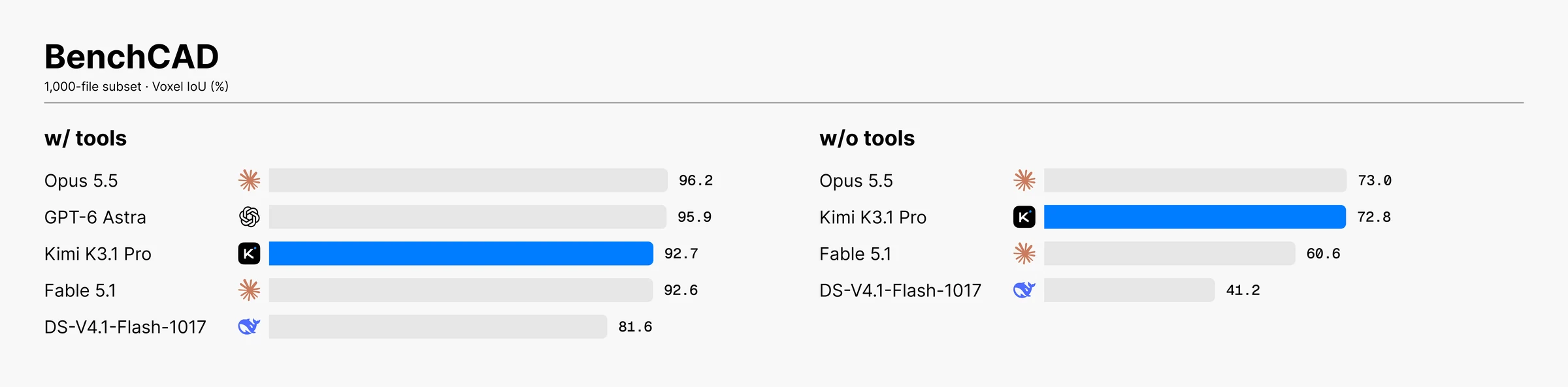
| BenchCAD configuration | Reported score |
|---|---|
| With tools | 92.7 |
| Without tools | 72.8 |
BenchCAD measures reconstruction through CAD code; these figures use a 1,000-case subset and a voxel-IoU metric. The with-tools result incorporates an execution environment.
Financial document and research evaluations
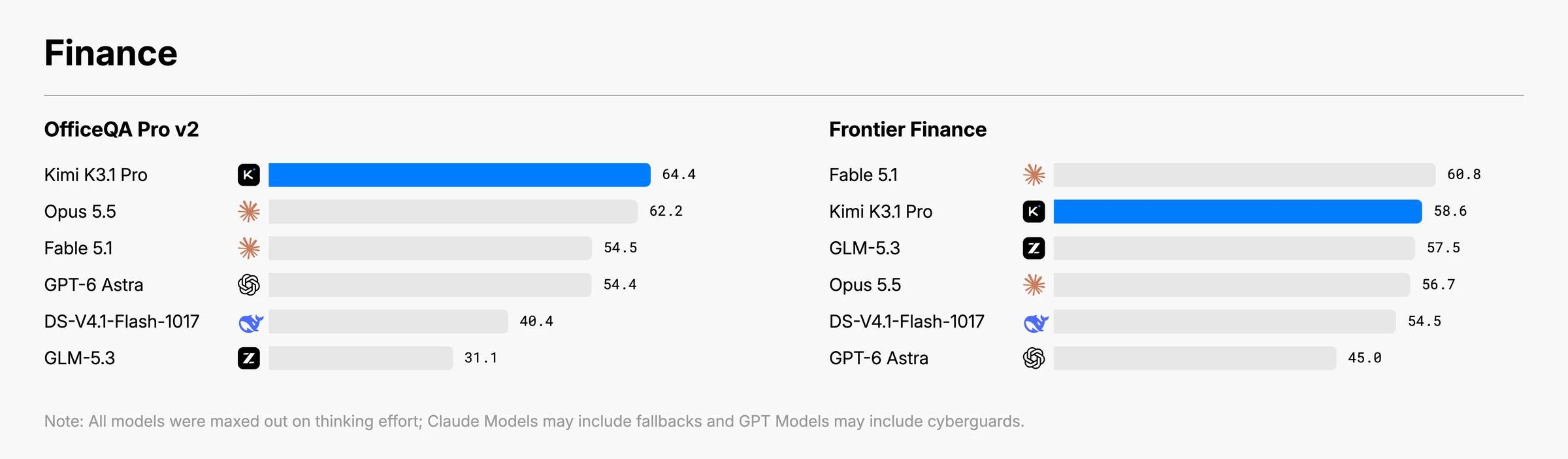
| Benchmark | Reported score |
|---|---|
| OfficeQA Pro v2 | 64.4 |
| Frontier Finance | 58.6 |
These evaluations assess document-centered and financial workflows under their respective benchmark conditions.
Factual accuracy evaluations
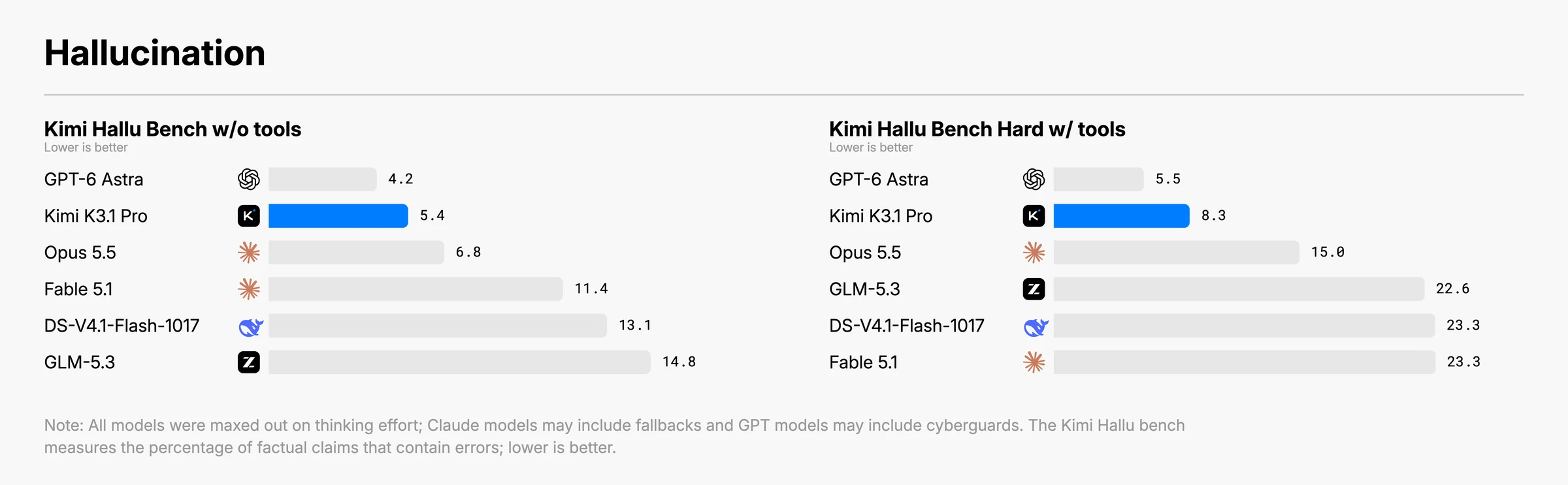
| Internal benchmark | Reported claim-level hallucination rate |
|---|---|
| Kimi Hallu Bench, without tools | 5.4% |
| Kimi Hallu Bench Hard, with tools | 8.3% |
Lower is better. These are internal stress tests on different task sets; the figures are not general everyday error rates.
Reading the figures
Published results generally use maximum reasoning effort, temperature: 1.0, and top_p: 0.95, unless a benchmark specifies otherwise. Harnesses, tool access, scoring rules, and run counts differ. The original figures retain comparison labels and their evaluation notes.
Benchmark tool access belongs to the evaluation environment. In your application, function execution and tool results are supplied by your own code, as demonstrated in the round-trip example.
Architecture reference
The published model specification describes a sparse MoE architecture with a hybrid attention stack.
| Component | Published specification |
|---|---|
| Decoder layers | 93 |
| Dense layers | 1 |
| Attention composition | 69 KDA layers + 24 Gated DSA layers |
| Attention hidden dimension | 7,168 |
| Attention heads | 96 |
| Routed experts | 896 |
| Selected routed experts per token | 16 |
| Shared experts | 2 |
The parameter count describes the whole model; the active-parameter count describes the portion activated for token processing. The two figures should be read together when comparing MoE architectures.
Integration checklist
- Use
moonshotai/Kimi-K3.1-Proas the model identifier. - Set
reasoning_effortexplicitly for the behavior your application needs. - Budget completion tokens for both reasoning and the final answer.
- Preserve complete assistant messages when returning tool results.
- Match every tool result to its
tool_call_id. - Parse final-answer JSON separately from
reasoning_content. - Handle the final usage event separately when consuming a stream.
- Record the HTTP status, error code, and
x-request-idwhen diagnosing failed requests.
The examples allow 300 seconds for a request. Verification included successful requests taking more than 90 seconds, so a shorter client deadline can interrupt a request before it returns. Choose deadlines appropriate to your application's workflow.
References
- Original Kimi K3.1 Pro release and benchmark figures
- Published model specification
- DEVUP AI quickstart
- DEVUP AI vision and OCR guide
- DEVUP AI error reference
DEVUP AI integration examples are based on successful verification requests performed on 6 November 2026. Benchmark images and reported benchmark scores are attributed to the original release.


