 Low-Code Builder
DEVUP AI for Dify
Add DEVUP AI models to Dify with the OpenAI-API-compatible plugin. Your chatflows, agents and knowledge bases then run on DEVUP AI models and DEVUP AI embeddings.
System Architecture
How Dify Connects to DEVUP AI
Configuration
Two Settings That Matter
API Base URL
Entered in the OpenAI-API-compatible plugin for every DEVUP AI model.
Model Name
A catalog model ID written exactly as listed; BAAI/bge-m3 for embeddings.
Quick Start
Three Steps in Dify
| Step | Where | What to do |
|---|---|---|
| 1 | Marketplace | Install the OpenAI-API-compatible plugin by langgenius. |
| 2 | Integrations | On OpenAI-API-compatible, choose Add Model and enter the chat model settings from the guide. |
| 3 | Studio | In your app's LLM node or model picker, choose DeepSeek V4 Pro (DEVUP AI). |
In Action
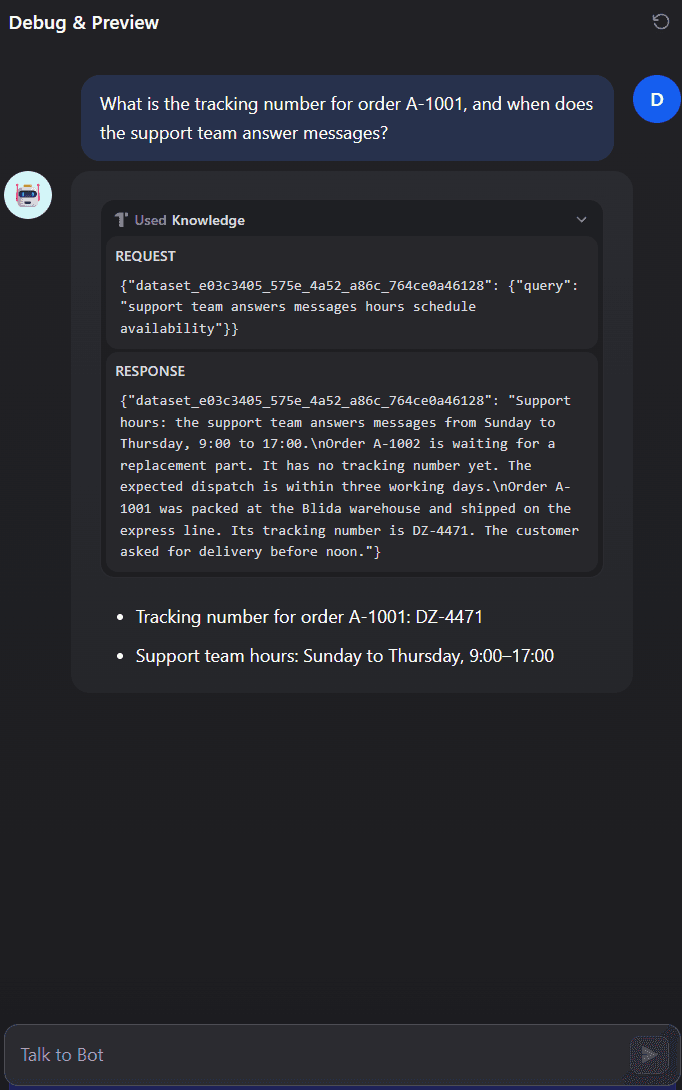
A Dify Agent Answering from Its Knowledge Base
Capabilities
Supported Capabilities
Chatflows with memory
Chatflows keep the conversation, so follow-up questions reach the model with their context.
Agents with tools
With Function Call Type set to Tool Call, Dify agents call tools on DEVUP AI models.
Knowledge bases
BAAI/bge-m3 from DEVUP AI embeds your documents and queries for High Quality retrieval.
Local DZD billing
Metered billing in Algerian Dinar with BaridiMob, Edahabia, and CIB local payment support.
FAQ
Dify and DEVUP AI
Does Dify work with DEVUP AI?
Yes. Install the OpenAI-API-compatible plugin, add DEVUP AI models with the API Base URL https://api.devupai.com/v1 and your DEVUP AI key, and choose them in your apps. Chatflows, agents and knowledge bases then run on DEVUP AI.
Which Dify plugin do I use?
The OpenAI-API-compatible plugin by langgenius, from the Dify Marketplace. Each DEVUP AI model is added to it with Add Model.
Can Dify agents call tools on DEVUP AI models?
Yes. Set Function Call Type to Tool Call and Stream function calling to Support on the model. Agents then call their tools and answer from the results.


