 inclusionAI /
LingSante-3.1-air-VL
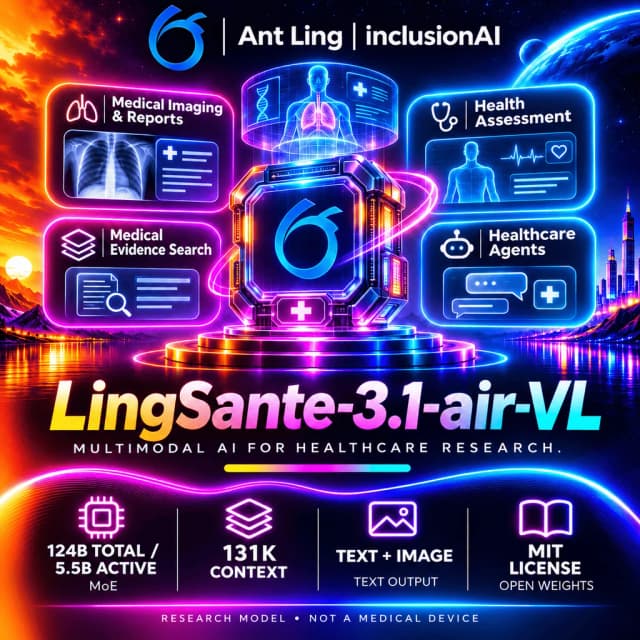
A medical vision-language model from Ant Group: send text and up to 16 images — X-rays and scans, skin and meal photos, lab reports — and it reasons like a careful clinician, weighing history and image quality before giving a structured answer. Drafts imaging reports, answers clinical questions and runs medical agents with tool calling and JSON output. 124B MoE, 5.5B active.
- Tools
- Vision
- PDF input
- Reasoning
- Structured output
- Reasoning
- Always on
reasoning_effort- low
- medium
- high
Use LingSante-3.1-air-VL in VS Code, Cursor and Antigravity
DEVUP Code, the DEVUP AI extension, is free to install. Requests are paid from your DEVUP balance.
LingSante 3.1 air VL

LingSante 3.1 air VL is a medical vision-language model from Ant Group's healthcare team, released on 22 November 2026. It reads clinical images and medical documents alongside text — X-rays and other scans, photos of skin and meals, lab reports, screenshots — and reasons over them the way a careful clinician works: it weighs the history and the quality of the image, walks through a differential, and writes a structured answer.
It is a Mixture-of-Experts model of 124B parameters with only 5.5B active per token, so it answers quickly for its size. It is built on Ling-3.0-flash-VL and keeps that model's general strengths — document and chart understanding, OCR, everyday visual questions — while adding deep medical training.
Weights are open under the MIT license.
At a glance
| Model type | Natively multimodal Mixture-of-Experts, specialised for healthcare |
| Base model | Ling-3.0-flash-VL |
| Total parameters | 124B |
| Active per token | 5.5B |
| Input | Text, up to 16 images per request, PDF |
| Output | Text |
| Maximum context size | 131,072 tokens |
| Maximum output | 32,768 tokens |
| Reasoning | On by default |
| Released | 22 November 2026 |
| License | MIT |
The 131,072-token window covers the prompt, the images and the reply together.
What it is built for
- Imaging report drafts. Read a chest X-ray or another study — several images in one request — and draft the Findings and Impression sections.
- Health assessment from photos. Skin conditions, meals and nutrition, lab and medical reports. Before it assesses, the model asks the follow-up questions a clinician would: how long, where exactly, what history.
- Medical Q&A and evidence synthesis. Answer clinical questions, and summarise guidelines or papers you provide or that your own search tool returns.
- Medical agents. Function calling and JSON output for workflows such as appointment booking, medication lookup and form filling.
Ant Group's training follows the clinical reading process itself: supervision built around how images are interpreted, reinforcement learning that scores the type and location of abnormalities as well as false positives and missed findings, multimodal search training, and distillation from both general and medical-specialty teacher models.
Getting started
curl https://api.devupai.com/v1/chat/completions \
  -H "Authorization: Bearer $DEVUP_API_KEY" \
  -H "Content-Type: application/json" \
  -d '{
    "model": "inclusionAI/LingSante-3.1-air-VL",
    "temperature": 0.6,
    "top_p": 0.95,
    "messages": [{
      "role": "user",
      "content": [
        { "type": "image_url", "image_url": { "url": "https://example.com/chest_xray.png" } },
        { "type": "text", "text": "Read this chest X-ray and draft a structured imaging report." }
      ]
    }]
  }'
Python, using the OpenAI client, with a local image:
import base64, os
from openai import OpenAI

client = OpenAI(
    api_key=os.environ["DEVUP_API_KEY"],
    base_url="https://api.devupai.com/v1",
)

with open("chest_xray.png", "rb") as f:
    image_url = "data:image/png;base64," + base64.b64encode(f.read()).decode()

response = client.chat.completions.create(
    model="inclusionAI/LingSante-3.1-air-VL",
    temperature=0.6,
    top_p=0.95,
    messages=[{
        "role": "user",
        "content": [
            {"type": "image_url", "image_url": {"url": image_url}},
            {"type": "text", "text": "Read this chest X-ray and draft a structured imaging report."},
        ],
    }],
)

print(response.choices[0].message.content)
Node.js:
import OpenAI from "openai";

const client = new OpenAI({
  apiKey: process.env.DEVUP_API_KEY,
  baseURL: "https://api.devupai.com/v1",
});

const response = await client.chat.completions.create({
  model: "inclusionAI/LingSante-3.1-air-VL",
  temperature: 0.6,
  top_p: 0.95,
  messages: [{
    role: "user",
    content: [
      { type: "image_url", image_url: { url: "https://example.com/lab_report.jpg" } },
      { type: "text", text: "Summarise the abnormal values in this lab report and what they usually indicate." },
    ],
  }],
});

console.log(response.choices[0].message.content);
temperature: 0.6 with top_p: 0.95 is the sampling Ant Group recommends for most tasks.
Several images in one request
A study often has more than one view, and a follow-up is easier to read next to the earlier image. Send up to 16 images in a single message, each as its own image_url part — PNG, JPEG, WebP or GIF, by https:// link or base64 data: URL.
response = client.chat.completions.create(
    model="inclusionAI/LingSante-3.1-air-VL",
    max_tokens=6000,
    messages=[{
        "role": "user",
        "content": [
            {"type": "text", "text": "The first image is from March, the second from November. Describe what changed."},
            {"type": "image_url", "image_url": {"url": march_image}},
            {"type": "image_url", "image_url": {"url": november_image}},
        ],
    }],
)
The model keeps the images apart and in order: given two images in our test, it read each one and returned them first image first.
PDF documents
Discharge letters, lab results and papers can be sent as PDF file parts:
import base64

with open("discharge_summary.pdf", "rb") as f:
    pdf = base64.b64encode(f.read()).decode()

response = client.chat.completions.create(
    model="inclusionAI/LingSante-3.1-air-VL",
    max_tokens=6000,
    messages=[{
        "role": "user",
        "content": [
            {"type": "text", "text": "List the diagnoses, the medications at discharge and the follow-up plan."},
            {"type": "file", "file": {
                "filename": "discharge_summary.pdf",
                "file_data": f"data:application/pdf;base64,{pdf}",
            }},
        ],
    }],
)
Reasoning
The model thinks before it answers. The thinking arrives in reasoning_content, separate from the answer in content, and is counted in usage.completion_tokens_details.reasoning_tokens.
msg = response.choices[0].message
print("reasoning:", msg.reasoning_content)
print("answer:", msg.content)
On a short question in our tests the reasoning stayed brief — 82 to 111 tokens — and content held only the answer, exactly in the format requested.
Keep reasoning on
reasoning_effort: "none" is accepted, but it does not make answers shorter or cheaper. Run on the same short question:
| Setting | Total output tokens | What content contained |
|---|---|---|
| Default (reasoning on) | 89–118 | 2h 35m, as requested |
reasoning_effort: "none" | 136–217 | A step-by-step working, ignoring the requested format |
With the reasoning field switched off, the model works the problem out loud inside the answer instead. For clinical reading, where you want a clean structured report and the reasoning kept separate, leave reasoning on.
low, medium and high are also accepted. They do not change how much the model thinks: repeated runs at a single level vary more than the levels differ from each other. There is no need to set reasoning_effort at all.
Leave room for the answer
Reasoning and answer share max_tokens, and a full imaging report is long. Give report-writing requests several thousand tokens, and check that finish_reason is stop before using the output.
Tool calling
Pass tools to let the model call your functions — appointment systems, formularies, patient-record lookups, search. It works with tool_choice on auto, set to "required", or naming a single function.
tools = [{
    "type": "function",
    "function": {
        "name": "find_drug_interactions",
        "description": "Return known interactions between the given medications",
        "parameters": {
            "type": "object",
            "properties": {
                "medications": {"type": "array", "items": {"type": "string"}}
            },
            "required": ["medications"],
        },
    },
}]

response = client.chat.completions.create(
    model="inclusionAI/LingSante-3.1-air-VL",
    max_tokens=6000,
    messages=[{"role": "user", "content": "Can a patient on warfarin take ibuprofen for back pain?"}],
    tools=tools,
)

for call in response.choices[0].message.tool_calls or []:
    print(call.function.name, call.function.arguments)
Ant Group trained the model for multimodal search and tool use together, so it can take a finding from an image, look up supporting evidence, and fold the result into its answer.
Structured output
json_schema and json_object are both honoured — useful for filling forms or feeding a report into another system.
curl https://api.devupai.com/v1/chat/completions \
  -H "Authorization: Bearer $DEVUP_API_KEY" \
  -H "Content-Type: application/json" \
  -d '{
    "model": "inclusionAI/LingSante-3.1-air-VL",
    "max_tokens": 6000,
    "messages": [{
      "role": "user",
      "content": [
        { "type": "image_url", "image_url": { "url": "https://example.com/cbc_report.png" } },
        { "type": "text", "text": "Extract every value from this blood count with its unit and reference range." }
      ]
    }],
    "response_format": {
      "type": "json_schema",
      "json_schema": {
        "name": "lab_results",
        "strict": true,
        "schema": {
          "type": "object",
          "properties": {
            "results": {
              "type": "array",
              "items": {
                "type": "object",
                "properties": {
                  "test": { "type": "string" },
                  "value": { "type": "string" },
                  "unit": { "type": "string" },
                  "reference_range": { "type": "string" }
                },
                "required": ["test", "value", "unit", "reference_range"],
                "additionalProperties": false
              }
            }
          },
          "required": ["results"],
          "additionalProperties": false
        }
      }
    }
  }'
Prompt caching
Repeated input is billed at the cached rate. If every request carries the same system instructions — a report template, a house style, a list of tools — put them first and the patient-specific material last, so the shared prefix is reused.
Benchmarks
Ant Group evaluated the model against its base model and representative open- and closed-source models across multimodal health analysis, imaging report generation, medical visual question answering and complex reasoning, text-based medical knowledge, document and chart understanding, multimodal search, tool use and GUI interaction.

This chart and the evaluation overview at the top of this page are Ant Group's own results.
LingSante or Ling-3.0-flash-VL?
The two share an architecture and a size. Choose LingSante 3.1 air VL when the work is medical — clinical images, reports, health questions, medical agents. Choose Ling-3.0-flash-VL for general multimodal work with no medical focus, and when you need video input — Ling-3.0-flash-VL is built for video, while LingSante is documented for text and images only.
Common pitfalls
| Symptom | Cause | Fix |
|---|---|---|
| Long, step-by-step answers that ignore the requested format | reasoning_effort: "none" was sent | Leave reasoning_effort unset |
high thinks no more than low | Effort levels are not graded on this model | Don't set it |
A report cut off mid-section, finish_reason: "length" | max_tokens too low for reasoning plus report | Raise max_tokens |
| A study with more than 16 images | The model takes up to 16 images per request | Split across requests |
| A different reading on a blurry or cropped image | Image quality changes interpretation | Send the clearest, full-resolution image available |
Intended use
In Ant Group's words, LingSante 3.1 air VL is a research model, not a medical device. Its output is meant to support qualified professionals, who review it before it informs any decision about a patient.
References
- Introducing LingSante-3.1-air-VL — Ant Group's release post, with demos and evaluation charts.
- LingSante-3.1-air-VL on Hugging Face — weights and model card.
- LingSante collection — the full LingSante model family.


